Loading
Get Canada Complete Balance Health Centre Chiropractic Intake Form
How it works
-

Open form follow the instructions
-

Easily sign the form with your finger
-

Send filled & signed form or save
How to fill out the Canada Complete Balance Health Centre Chiropractic Intake Form online
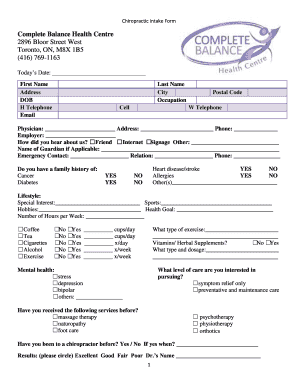
Completing the Canada Complete Balance Health Centre Chiropractic Intake Form online is a straightforward process designed to gather essential information for your chiropractic care. This guide will walk you through the necessary steps to ensure that your intake form is filled out accurately and efficiently.
Follow the steps to successfully complete the form online.
- Click ‘Get Form’ button to access the form and open it in an online editor for editing.
- Begin by entering today's date in the designated field at the top of the form. Ensure the date is accurate to avoid any discrepancies.
- Fill in your first name and last name in the respective fields. This helps establish your identity.
- Provide your address, including city, postal code, and contact numbers. This information is essential for communication regarding your appointments.
- Enter your date of birth (DOB) to assist in identifying your medical history more accurately.
- Indicate your occupation, as it may relate to your health and chiropractic needs.
- List the name and contact details of your physician, and your employer, if applicable. This helps connect your care with your existing health providers.
- Complete the 'how did you hear about us?' section by checking the appropriate response. This assists the clinic in understanding their outreach effectiveness.
- Include the name of a guardian if necessary, along with emergency contact information and their relation to you.
- Address any family health history by indicating any known issues with conditions such as cancer, diabetes, and heart disease.
- Detail your lifestyle habits, preferences, and exercise routines. This section provides insight into your daily health behaviors.
- Complete the mental health inquiries by checking relevant conditions, which can influence your overall wellness.
- Assess your chiropractic care history by indicating if you have experienced certain services before and your interest in specific levels of care.
- Detail any current conditions or symptoms you experience as indicated in the symptoms section, providing precise descriptions where necessary.
- Complete the pain diagram and questionnaire accurately to convey your physical health condition.
- Review all provided information to ensure accuracy, then proceed to save changes or download the form.
- Finally, print or share the completed form as required for your appointment.
Start completing your Canada Complete Balance Health Centre Chiropractic Intake Form online today for a smooth chiropractic experience.