Loading
Get Uk Unh Education & Training Plan 2016-2026
How it works
-

Open form follow the instructions
-

Easily sign the form with your finger
-

Send filled & signed form or save
How to fill out the UK UNH Education & Training Plan online
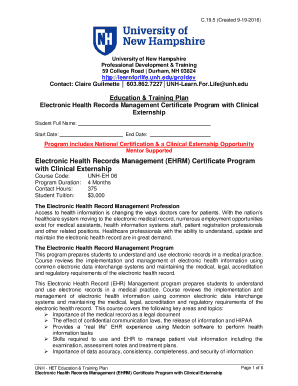
Filling out the UK UNH Education & Training Plan online is a straightforward process designed to assist you in documenting your education and training goals. This guide offers a step-by-step approach to ensure you complete the form accurately and efficiently.
Follow the steps to successfully complete your online Education & Training Plan.
- Press the ‘Get Form’ button to access the UK UNH Education & Training Plan and open it in your editor.
- Enter your full name in the 'Student Full Name' field. This ensures that your document is attributed to you correctly.
- Fill in the 'Start Date' field with the date you plan to commence your program. Be sure to use the format required by the form.
- In the 'End Date' section, specify the expected date of completion for your training. This helps in planning and scheduling your responsibilities.
- Provide the 'Course Code,' which identifies your specific program. Ensure accuracy to facilitate correct tracking of your training.
- Indicate the program duration in the designated field. For example, you might enter '4 Months' if that is the typical length for your course.
- Complete the 'Contact Hours' field to reflect the total hours you will engage in training. For instance, you will input '375' for this program.
- Fill in the 'Student Tuition' amount to clarify the cost of the program. This would typically be '3,000' for the specified course.
- Review all entered information to ensure accuracy. Corrections are easier to make before finalizing the document.
- Once completed, you have the option to save your changes, download, print, or share your form as needed.
Take the first step towards your education and training by completing the UK UNH Education & Training Plan online today.
UNH: University of New Hampshire.