Loading
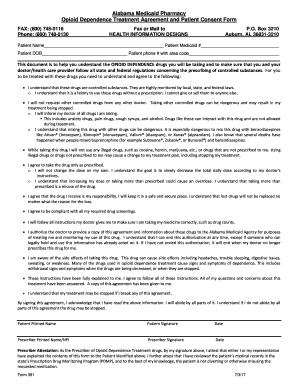
Get Al Medicaid Pharmacy Form 391 2017-2026
How it works
-

Open form follow the instructions
-

Easily sign the form with your finger
-

Send filled & signed form or save
How to fill out the AL Medicaid Pharmacy Form 391 online
Filling out the AL Medicaid Pharmacy Form 391 is essential for individuals seeking opioid dependence treatment. This guide offers clear instructions to help users navigate the online form efficiently.
Follow the steps to complete the form accurately and efficiently.
- Click the ‘Get Form’ button to obtain the form and open it in the online editor.
- Begin by entering the patient’s name in the designated field. This should include the full legal name as it appears on official identification.
- Fill in the patient Medicaid number in the respective space, ensuring it matches the official Medicaid documentation.
- Provide the patient's date of birth in the required format. This information helps verify the patient's identity.
- Enter the patient’s phone number with area code. This information is necessary for any follow-up communication.
- Read through the agreement section carefully. Make sure to understand the conditions and implications of the treatment outlined in the form.
- Both the patient and prescriber should sign and date the form in the designated areas. Ensure all signatures are clear and correctly dated.
- Review the completed form for accuracy. Check all entered information against your documents to ensure there are no mistakes.
- Once confirmed that all details are correct, save the changes made to the form. You can then download, print, or share the completed document as needed.
Complete your documents online seamlessly and securely.
To qualify for Medicaid, applicants must meet income, age or other requirements; provide proof of income and other information, fill out forms correctly and turn in a completed application to the correct office or worker. For more help, applicants should contact 1-800-362-1504.