Loading
Get Form Nfp 105.10/105.20 2003-2026
How it works
-

Open form follow the instructions
-

Easily sign the form with your finger
-

Send filled & signed form or save
How to fill out the Form NFP 105.10/105.20 online
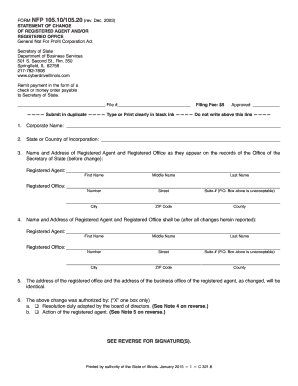
Filling out the Form NFP 105.10/105.20 is an essential step for nonprofit corporations in changing their registered agent or registered office. This guide will provide you with clear, step-by-step instructions to complete the form accurately and efficiently online.
Follow the steps to complete the Form NFP 105.10/105.20 online
- Press the ‘Get Form’ button to access the form and open it in your chosen editor.
- In the first section, fill in the 'Corporate Name' using the official name of your corporation as registered.
- Indicate the 'State or Country of Incorporation'. Ensure that this matches the information on your initial registration.
- Provide the 'Name and Address of Registered Agent and Registered Office' as they currently appear. Include first name, middle name, last name, street address, city, ZIP code, and county.
- In the next section, enter the 'Name and Address of Registered Agent and Registered Office' as they will be after the changes. Ensure accuracy in the new details.
- Confirm that the address of the registered office and the address of the business office of the registered agent, as changed, will be identical.
- Authorize the change by marking the box that applies, either the 'Resolution duly adopted by the board of directors' or 'Action of the registered agent'.
- If authorized by the board of directors, sign the form where indicated. The signature should belong to an authorized officer of the corporation.
- If the registered agent is making the change, have them sign where indicated, affirming the truth of the information under penalties of perjury.
- Once you have filled out the entire form, save your changes. You may also choose to download, print, or share the completed form as needed.
Complete your documents online today for a smooth process.
The IRS maintains an “Exempt Organizations Select Check Tool” (available at https://.irs.gov/charities-non-profits/exempt-organizations-select-check ), which enables a user to search for organizations to determine their eligibility to receive tax-deductible charitable contributions.