Loading
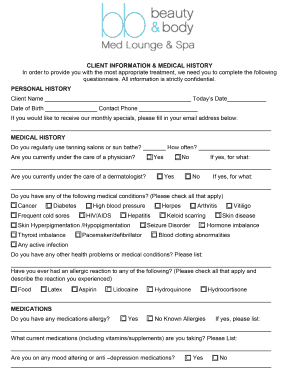
Get Client Information & Medical History
How it works
-

Open form follow the instructions
-

Easily sign the form with your finger
-

Send filled & signed form or save
How to fill out the Client Information & Medical History online
Filling out the Client Information & Medical History online is a vital step in ensuring accurate health records and facilitating proper care. This guide provides clear instructions to help you navigate the form and complete it efficiently.
Follow the steps to complete the Client Information & Medical History online.
- Press the ‘Get Form’ button to access the Client Information & Medical History form and open it in your preferred editor.
- Begin with the personal information section, where you will need to enter your name, date of birth, and contact information. Ensure all details are accurate to avoid any issues with your healthcare.
- In the medical history section, provide details about any past medical conditions, surgeries, or treatments you have received. Be as thorough as possible to assist healthcare providers in understanding your health background.
- Fill out your current medications, including any over-the-counter drugs, vitamins, or supplements. This information is crucial for preventing adverse reactions.
- Indicate any allergies you may have, including allergies to medicines, food, or environmental factors.
- Complete the emergency contact section with the name and phone number of someone we can reach in case of an emergency.
- Review all the information you entered for accuracy and completeness. Make sure no sections are left blank unless they are optional.
- Once satisfied with the details, you can save changes, download, print, or share the completed form as needed.
Start filling out your Client Information & Medical History online today for better health management.
The client's name and contact details. Information about their company and its industry. Specific information about what they need from you. Business contract details.