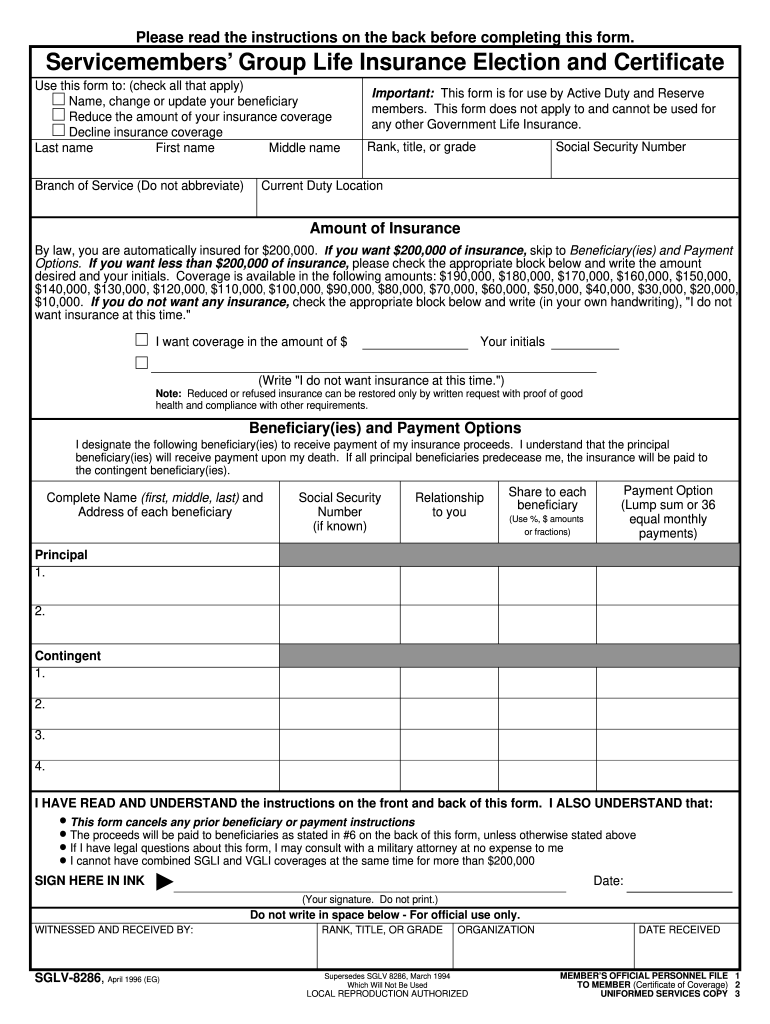
Please read the instructions on the back before completing this form. Service members Group Life Insurance Election and Certificate Use this form to: (check all that apply) Name, change or update.

Open form follow the instructions

Easily sign the form with your finger

Send filled & signed form or save
How to fill out the SGLV-8286 online
Filling out the SGLV-8286 form online is a straightforward process that allows active duty and reserve members to manage their Servicemembers’ Group Life Insurance. This guide provides detailed, step-by-step instructions to ensure the form is completed accurately.
Follow the steps to fill out the SGLV-8286 form correctly.
- Click the ‘Get Form’ button to obtain the form and open it in your editor. This will allow you to fill out the information required.
- In the first section, enter your last name, first name, and middle name. Include your branch of service and do not abbreviate the name.
- Fill in your rank, title, or grade, followed by your Social Security number and current duty location.
- Indicate the amount of insurance you desire. By default, everyone is insured for $200,000. If you'd like a different amount, check the appropriate box and write your initials next to the amount desired.
- If you do not want any insurance, check the corresponding box and write, 'I do not want insurance at this time,' in your own handwriting.
- Proceed to the Beneficiary(ies) and Payment Options section. Designate your beneficiaries by entering their complete name, address, Social Security number (if known), relationship to you, share of the proceeds, and payment option (lump sum or 36 equal monthly payments).
- If you have more than two principal beneficiaries, list them on a separate sheet and reference it here, ensuring to include your signature, Social Security number, and date on that sheet.
- Review all entered information for accuracy. Ensure your designation of beneficiaries is clear and that shares total 100%.
- Sign the form in ink and date your signature. Remember that an authorized agent of the Uniformed Services must witness your signature.
- Save changes to the form, ensuring all details are correct. Download, print, or share the form as needed while making sure it is properly submitted to your Uniformed Service.
Begin filling out your SGLV-8286 online today to ensure your life insurance designations are up to date.
Experience a faster way to fill out and sign forms on the web. Access the most extensive library of templates available.
Related content
SGLV 8286. 1. About You. Print Name (First, Middle, Last). Rank, title or grade. Social...
SGLV 8286. 1. About You. Print Name (First, Middle, Last). Rank, title or grade. Social...
... turn in any No Fee Government Passports • SGLI – Retrieve form from PRDA (SGLV...
Get answers to your most pressing questions about US Legal Forms API.
How to complete Sgli online?
To access, go to SOES, sign in, and go to Benefits, Life Insurance SOES- SGLI Online Enrollment System. Servicemembers can log in with their CAC or with their DS Logon as soon as they receive notice that SOES access is available. Servicemembers can then make sure their SGLI coverage and beneficiaries are up-to-date.
How do I cancel my Air Force Sgli?
A: If you have full time SGLI coverage, you can decline or cancel your coverage with the SGLI Online Enrollment System (SOES) in milConnect. Just sign in and look for Life Insurance on the Benefits menu. SOES appears on the menu if your Service supports it. Otherwise, you can only check your coverage.
What is the form number for SGLV?
Check the box and complete Supplemental SGLI Beneficiary Form, SGLV 8286S.
How do I print off my Sgli army?
In the SGLI Certification Complete popup, click OK. To view, print, save, and/or email your certificate, click the Print/Save Certificate tab.
What is a SGLV 8286?
SGLV 8286, Servicemembers' Group Life Insurance Election and Certificate.
How do I access my SGLV?
To access, go to SOES, sign in, and go to Benefits, Life Insurance SOES- SGLI Online Enrollment System. Servicemembers can log in with their CAC or with their DS Logon as soon as they receive notice that SOES access is available. Servicemembers can then make sure their SGLI coverage and beneficiaries are up-to-date.
How do I update my Army SGLV?
Can I make changes to my benefits? Go to milConnect. Sign in. Go to Benefits, Life Insurance SOES-SGLI Online Enrollment System. Check your coverage and beneficiary information and make any needed updates.
Use professional pre-built templates to fill in and sign documents online faster. Get access to thousands of forms.
If you believe that this page should be taken down, please follow our DMCA take down process here.