Loading
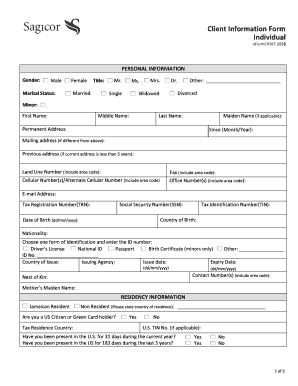
Get Client Information Form Individual 2018-2026
How it works
-

Open form follow the instructions
-

Easily sign the form with your finger
-

Send filled & signed form or save
How to fill out the Client Information Form Individual online
Filling out the Client Information Form Individual online is a crucial step in ensuring your personal and financial information is accurately recorded. This guide will walk you through each section of the form, providing clear instructions to help you complete it efficiently.
Follow the steps to complete the Client Information Form Individual online.
- Click the ‘Get Form’ button to access the form and open it in your web browser.
- Begin by entering your personal information. Fill in your gender, marital status, title, full name, permanent address, mailing address (if different), and previous address (if applicable). Include your landline, cellular, and office numbers, along with your email address.
- Next, provide your Tax Registration Number (TRN), Social Security Number (SSN), Tax Identification Number (TIN), country of birth, date of birth, and nationality. Select an identification type and enter the associated ID number and details.
- Indicate your residency information. Specify if you are a Jamaican resident or non-resident, and provide your tax residence country. Answer the questions regarding your presence in the U.S. and, if applicable, provide your U.S. TIN number.
- Complete the reference details section by listing the names, addresses, and contact numbers of two referees. Make sure to select the appropriate referee type for each contact.
- Provide your employment information. State your employment type, employer name, address, business type, job title, tenure, start date, and relevant contact numbers.
- Fill in your financial information, including previous and current banking relationships, and select your annual income range.
- Address the politically exposed persons section by stating if you or any immediate family members hold any significant governmental positions.
- In the electronic communications section, choose your preferred method of communication and read the terms provided carefully.
- Complete the sharing information section. Agree to the use of your information as described, sign, and provide your name and date.
- Finally, ensure your application is witnessed and signed accordingly if required. Once completed, save your changes, and you may choose to download, print, or share your form as needed.
Start filling out your Client Information Form Individual online today to ensure a smooth submission process.
What Is a Client Information Form? Organizations use a client information form (or sheet) to keep client information details on hand, so that interactions with clients can run as smoothly as possible.