Loading
Get Recruitment Form C-approval To Extend Offer 2011-2026
How it works
-

Open form follow the instructions
-

Easily sign the form with your finger
-

Send filled & signed form or save
How to use or fill out the Recruitment Form C-Approval To Extend Offer online
Completing the Recruitment Form C-Approval To Extend Offer is an essential step in the faculty hiring process. This guide will provide you with clear and detailed instructions to ensure you effectively fill out the form online.
Follow the steps to successfully complete the Recruitment Form C-Approval To Extend Offer.
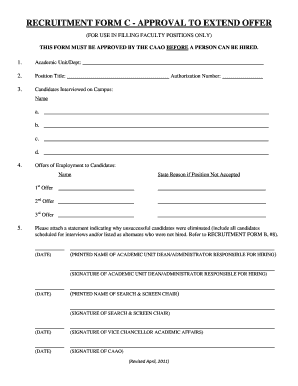
- Click ‘Get Form’ button to obtain the form and open it in the editor.
- Begin by entering the academic unit or department name in the specified field.
- Next, fill in the position title and corresponding authorization number for the role.
- List the candidates who were interviewed on campus by entering their names in the provided spaces (a, b, c, d).
- For offers of employment, document each candidate's name and state the reason if the position was not accepted under the appropriate headings (1st Offer, 2nd Offer, 3rd Offer).
- Attach a statement detailing why unsuccessful candidates were eliminated, including all interviewed candidates and designated alternates. Reference Recruitment Form B, #8 as necessary.
- Complete the signature section by having the academic unit dean or administrator responsible for hiring print their name, sign, and date the form.
- The search and screen chair must also print their name, sign, and date the form in the designated area.
- Finally, obtain the signature of the vice chancellor of academic affairs and the CAAO along with their printed names and dates.
- Once you have filled out all sections and obtained the necessary signatures, you can save your changes, download, print, or share the completed form as needed.
Start filling out your Recruitment Form C-Approval To Extend Offer online today!