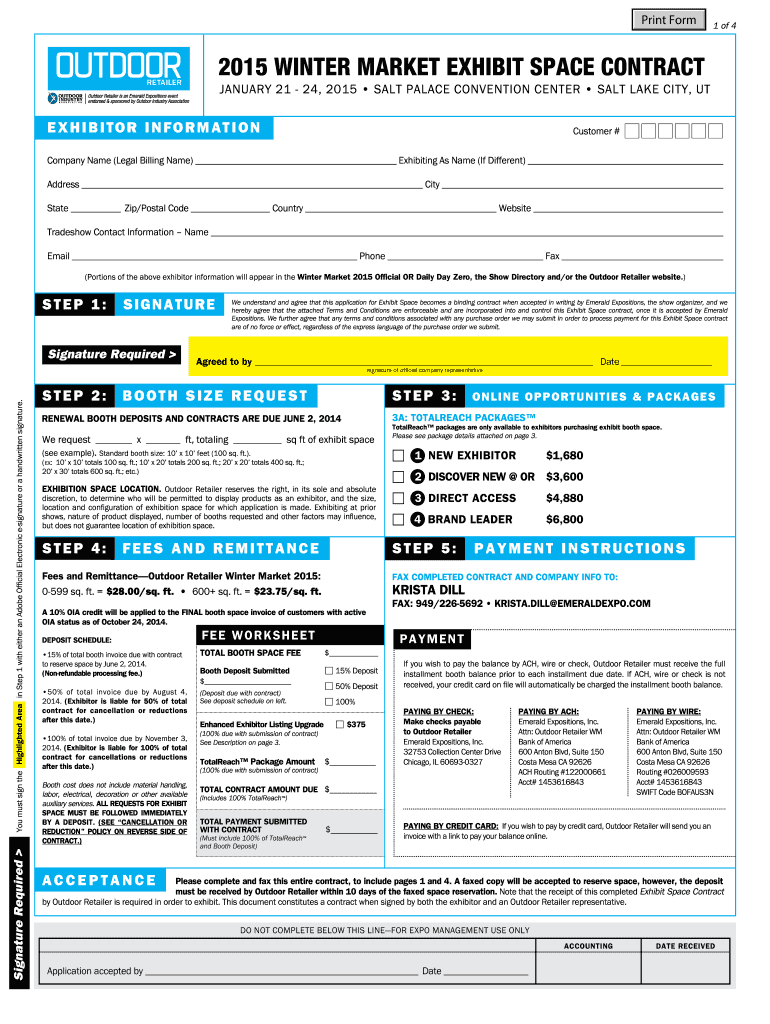
Me (Legal Billing Name) Exhibiting As Name (If Different) Address City State Zip/Postal Code Country Website Tradeshow Contact Information Name Email Phone Fax (Portions of the above exhibitor information will appear in the Winter Market 2015 Official OR Daily Day Zero, the Show Directory and/or the Outdoor Retailer website.) S TEP 1 : S i g n at ure Signature Required You must sign the Highlighted Area in Step 1 with either an Adobe Official Electronic e-signature or a hand.
Loading

Open form follow the instructions

Easily sign the form with your finger

Send filled & signed form or save
How to fill out the Winter Market Exhibit Space Contract online
This guide will assist you in completing the Winter Market Exhibit Space Contract online. By following these steps, you will ensure that all required information is submitted accurately and efficiently.
Follow the steps to successfully complete your exhibit space contract.
- Click 'Get Form' button to start the process of accessing the Winter Market Exhibit Space Contract. This will allow you to open the form in your browser.
- Enter your exhibitor information, including your customer number, company name (legal billing name), and exhibiting name (if different). Fill out your address, city, state, zip/postal code, country, and website. Make sure to provide the tradeshow contact's name, email, phone, and fax number as portions of this information will appear in the official show directory.
- In the signature section, you need to sign the highlighted area in Step 1 using either an Adobe official electronic e-signature or a handwritten signature.
- Review the acceptance section. Understand that your application becomes a binding contract accepted in writing by the show organizer. Acknowledge agreement with the attached terms and conditions by filling in your details.
- Specify your booth size request in Step 3. Indicate the desired booth dimensions in feet and calculate the total square footage. You may also select from the available TotalReach packages if applicable.
- Proceed to the fees and remittance section (Step 4). Review the fee schedule based on the size of your booth and indicate the payment amount as well as the deposit you are providing with your contract.
- Review the payment instructions and select the method you intend to use for remitting payment, whether it's by fax, ACH, wire, or credit card. Ensure that you include all necessary payment details.
- Once all fields are completed and you have made necessary payments, save your changes. You may choose to download, print, or share the completed form for your records and to send it to the appropriate fax number provided.
Start completing your Winter Market Exhibit Space Contract online today for a smooth application process.
Experience a faster way to fill out and sign forms on the web. Access the most extensive library of templates available.
Related content
The Premises are outlined on the plan attached to the Lease as Exhibit A. ... in similar...
Damages = contract price – market price + incidental damages – costs avoided, where...
Jan 19, 2021 — This letter responds to the business disagreement (“Disagreement”)...
Get answers to your most pressing questions about US Legal Forms API.
Do exhibits need to be signed?
Exhibits should be finalized when a contract is signed but exhibits generally should not be signed when the contract is signed. A schedule is also an attachment to the end of the contract. However, schedules usually consist of information important to the contract terms. Schedules, Exhibits, and Addenda–How They Differ and Pitfalls to Avoid jdsupra.com https://.jdsupra.com › legalnews › schedules-exhibit... jdsupra.com https://.jdsupra.com › legalnews › schedules-exhibit...
What are the 6 essential steps for introducing an exhibit in court?
Here's a check list for how to do it right. Ask That the Exhibit Be Marked for Identification. ... Let Opposing Counsel Examine the Exhibit. ... Lay the Foundation for the Exhibit. ... Offer the Exhibit into Evidence. ... Show the Exhibit to the Trial Judge. ... Voir Dire Examination of the Witness, Objection and Argument by Opposing Counsel. Steps in Introducing Exhibits - American Bar Association americanbar.org https://.americanbar.org › resources › litigation-news americanbar.org https://.americanbar.org › resources › litigation-news
How do you label exhibits in a legal document?
Marking exhibits: Each exhibit should be marked with an exhibit sticker or label for identification. Typically, exhibits are sequentially numbered (Exhibit 1, Exhibit 2, etc.) or lettered (Exhibit A, Exhibit B, etc.). 6 steps to building your exhibit list and preparing exhibits One Legal https://.onelegal.com › blog › building-exhibit-list... One Legal https://.onelegal.com › blog › building-exhibit-list...
How do I include exhibits in a paper?
Show your exhibit to the other side and mark it You do this by telling the judge what you are showing and ask to mark it as an exhibit. “Your Honor, I have here a 3-page document. It is titled 'Promissory Note' and dated June 26, 2020. I am showing it to the opposing counsel. How to introduce exhibits at a trial - California Courts | Self Help California Courts | Self Help (.gov) https://selfhelp.courts.ca.gov › how-introduce-exhibits-trial California Courts | Self Help (.gov) https://selfhelp.courts.ca.gov › how-introduce-exhibits-trial
How much does an exhibit space cost?
Your trade show budget should be roughly three times the amount you plan to spend on your exhibit. On average, it costs about $100-$150 per square foot of floor space. A 10×10 booth space will cost around $14,000, with a total budget of $42,000. Larger 20×20 spaces cost up to $20,000, with a total budget of $60,000.
What are the norms for including exhibits?
Exhibits are subject to the regular rules of evidence. They must be relevant, not unduly prejudicial, not confusing or misleading, and not contain evidence that is privileged, would violate the opinion rule, or constitutes inadmissible hearsay. 3.
Use professional pre-built templates to fill in and sign documents online faster. Get access to thousands of forms.
If you believe that this page should be taken down, please follow our DMCA take down process here.