Loading
Get Mdc 1016 2000-2026
How it works
-

Open form follow the instructions
-

Easily sign the form with your finger
-

Send filled & signed form or save
How to fill out the MDC 1016 online
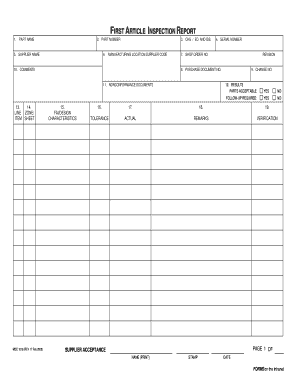
Filling out the MDC 1016 form online can streamline your documentation process for First Article Inspection reports. This guide provides clear, step-by-step instructions to ensure you complete the form accurately and efficiently.
Follow the steps to fill out the MDC 1016 form.
- Press the ‘Get Form’ button to access the MDC 1016 form and open it in your preferred editor.
- In the 'Part name' field, enter the nomenclature of the article as specified in block 2. This identifies the component being inspected.
- In the 'Part number' field, provide the part number as it appears in engineering drawing requirements.
- For 'CHG/ED. and ISS.', input the change letter or edition and issue of the part number relevant to your submission.
- Enter the 'Serial number' of the part being evaluated to keep a unique identification for tracking.
- Fill in the 'Supplier name' with the name of the supplier as documented in the purchase order.
- In the 'Manufacturing location/supplier code' field, specify the location where the part was manufactured and the supplier code as referenced in the purchase document.
- Provide the 'Shop order number' for the supplier's shop order number and the current revision of that order.
- Input the 'Purchase document number' that indicates the documentation imposing FAI requirements.
- Fill in the 'Change number' with the latest change from the purchase document relevant at the time of the FAI report.
- In the 'Comments' section, add any general comments related to the Initial Article Inspection that are not covered elsewhere.
- Document any 'Nonconformance documents' issued during manufacturing and inspection for the part number in the relevant field.
- Under 'Results', indicate if the parts are acceptable by checking 'YES' if they conform to all requirements or 'NO' if they do not.
- Check whether 'Follow-up required' applies, marking 'YES' if further actions are needed or 'NO' if all are complete.
- List any 'Remarks' associated with the design characteristics, including relevant certifications or data transmittal references.
- Enter 'Tolerance' values for the acceptable range of design characteristics as needed.
- Record the 'Actual' inspection results for specified characteristics, accepting or rejecting as applicable.
- In the 'Verification' section, apply necessary stamps confirming verification of recorded actuals.
- Ensure all required signatures and stamps are included, and specify the 'total number of pages' in the report.
- Finally, review your entries, save the document for future reference, and prepare to print or share as necessary.
Complete your First Article Inspection report efficiently by filling out the MDC 1016 form online today.