Loading
Get Check/eft/bank Wire Request Nonretirement 2013-2026
How it works
-

Open form follow the instructions
-

Easily sign the form with your finger
-

Send filled & signed form or save
How to fill out the Check/EFT/Bank Wire Request Nonretirement online
This guide will walk you through the process of completing the Check/EFT/Bank Wire Request Nonretirement form online. It is designed to be clear and supportive, ensuring that users of all experience levels can successfully navigate the form.
Follow the steps to complete your request online.
- Press the ‘Get Form’ button to access the Check/EFT/Bank Wire Request Nonretirement form and open it for editing.
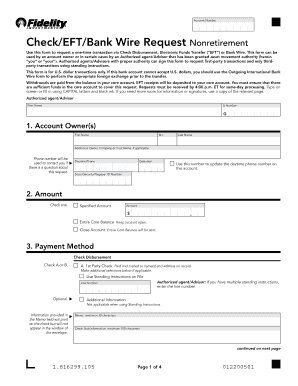
- Begin filling out the account owner section, including the first name, middle initial, last name, and any additional owner or trust name if applicable. Provide a daytime phone number for contact purposes and include the Social Security or Taxpayer ID number.
- Indicate the amount you wish to withdraw by selecting either a specified amount or the entire core balance. If closing the account, select the option for 'Close Account.'
- Choose your payment method. You can select check disbursement, electronic funds transfer (EFT), or bank wire, and provide any additional required information for the selected method.
- If opting for check disbursement, specify whether it is a first-party or third-party check. Fill in necessary details such as payee name, address, and memo information as required.
- For EFT or bank wire, ensure you select the correct type—1st party or 3rd party. Provide the bank routing number, bank name, bank account number, and other necessary details.
- Review and confirm that all information provided is accurate. Sign and date the form in the designated section. Remember, the form cannot be processed without these signatures.
- Once all fields are completed and signed, you can save your changes, download the form, print it out, or share it digitally as needed.
Complete your Check/EFT/Bank Wire Request Nonretirement online today for a secure and efficient processing experience.
The EFT Trace Number can be located in the Check Register. EFT button is required (EFT Trace Number is optional). Refund process is the same as before, will just add EFT button and EFT Trace Number along with Check/EFT Date adjustments in order to locate the EFT payments.