Loading
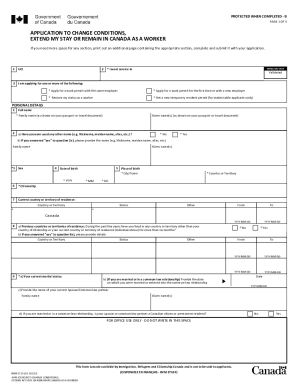
Get Canada Imm 5710 E 2019
How it works
-

Open form follow the instructions
-

Easily sign the form with your finger
-

Send filled & signed form or save
How to fill out the Canada IMM 5710 E online
The Canada IMM 5710 E form is essential for individuals seeking to change their conditions, extend their stay, or remain in Canada as a worker. This guide provides clear, step-by-step instructions to help users navigate the online filling process effectively.
Follow the steps to complete the Canada IMM 5710 E form online
- Click ‘Get Form’ button to obtain the form and open it in the editor.
- Begin by entering your Unique Client Identifier (UCI) and preferred language for service.
- Indicate the type of application you are submitting, such as applying for a work permit with the same or a new employer, restoring your status, or obtaining a new temporary resident permit.
- Fill in your personal details, including full name, date of birth, citizenship, and current country or territory of residence. Answer the required questions regarding previous names, marital status, and any previous relationships.
- Provide information regarding your native language, ability to communicate in either English or French, and any language proficiency tests you may have taken.
- Enter your passport details, including the passport number, the country of issue, as well as issue and expiry dates.
- Complete the contact information section with your current mailing and residential addresses. Include your telephone numbers and email address.
- Record details about your entry into Canada, including dates, places, and purposes of entry. Include any applicable document numbers pertaining to previous permits.
- Outline your intended work details, including the type of work permit you are applying for, employer information, job title, description of duties, and expected duration of employment.
- Fill out your educational background and employment history for the past 10 years, ensuring to include any government positions if applicable.
- Complete the background information section if you are 18 years of age or older, addressing health issues, previous visa applications, and any criminal history.
- Sign and date the application, ensuring all necessary documents, fees, and photographs are included before submission.
Complete your documents online today to ensure a smooth application process.
Get form
Experience a faster way to fill out and sign forms on the web. Access the most extensive library of templates available.
IMM 5710 E : Application to change conditions, extend my stay or remain in Canada as a worker.
Get This Form Now!
Use professional pre-built templates to fill in and sign documents online faster. Get access to thousands of forms.