Loading
Get Care Pharmacies Cooperative Inc Mckesson Transition Questionnaire 2015-2026
How it works
-

Open form follow the instructions
-

Easily sign the form with your finger
-

Send filled & signed form or save
How to fill out the CARE Pharmacies Cooperative Inc McKesson Transition Questionnaire online
Filling out the CARE Pharmacies Cooperative Inc McKesson Transition Questionnaire online is a straightforward process. This guide provides step-by-step instructions to ensure you complete the form accurately and efficiently.
Follow the steps to complete your form online.
- Click the ‘Get Form’ button to access the questionnaire and open it within your document management system.
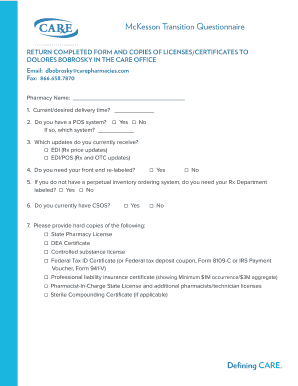
- Begin by entering your pharmacy name in the designated field at the top of the form.
- Provide your current or desired delivery time in the appropriate section.
- Indicate whether you have a point of sale (POS) system by selecting Yes or No, and, if applicable, specify which system you use.
- Next, check the updates you currently receive by choosing the relevant options for EDI (prescription price updates) or EDI/POS (prescription and over-the-counter updates).
- Decide if you need your front end re-labeled by selecting Yes or No.
- If you do not possess a perpetual inventory ordering system, indicate whether you need your prescription department labeled by checking Yes or No.
- Indicate if you currently have a Controlled Substance Ordering System (CSOS) by selecting Yes or No.
- In the designated area, provide hard copies of required documents such as your state pharmacy license, DEA certificate, controlled substance license, federal tax ID certificate, professional liability insurance certificate, pharmacist-in-charge state license, and sterile compounding certificate if applicable.
- Once you have completed all sections, save your changes, then choose the option to download, print, or share the filled-out form as needed.
Complete your document online today for a seamless transition with CARE Pharmacies.