Loading
Get Au Critical Client Incident Report 2018-2026
How it works
-

Open form follow the instructions
-

Easily sign the form with your finger
-

Send filled & signed form or save
How to fill out the AU Critical Client Incident Report online
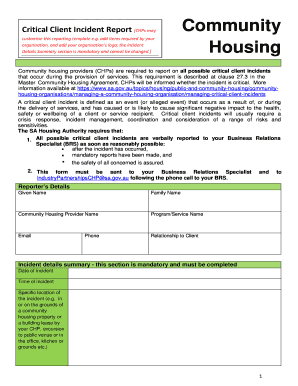
The AU Critical Client Incident Report is an essential document for community housing providers reporting critical incidents affecting clients. This guide offers a systematic approach to completing the form online, empowering users to navigate through each section with clarity and confidence.
Follow the steps to effectively complete the AU Critical Client Incident Report online.
- Press the ‘Get Form’ button to access the report and open it in the designated editor.
- Input your reporter’s details, including your given name, family name, community housing provider name, program or service name, email address, relationship to the client, and phone number. Ensure that all entries are accurate to facilitate timely communication.
- Complete the incident details summary, a mandatory section requiring specific information such as the date and time of the incident, the exact location, and a brief description of what occurred. It's important to include any relationships between parties involved.
- Detail the immediate steps taken to address the situation. Specify current safety issues and if coordination is required with other agencies, service providers, or governmental departments.
- In the media section, indicate whether the media has been informed of the incident, providing specifics about where it has been reported, if applicable.
- Describe the client involved, including other necessary client details such as date of birth, gender, and further consent on sharing their information.
- Respond to the incident questions, such as whether an injury was sustained and if first aid was administered. Provide detailed descriptions of treatment and whether hospitalization was needed.
- Document the feedback to the reporting person, indicating whether feedback has been provided and including comments as necessary.
- Finalize the report by attaching any relevant documents or additional evidence pertaining to the incident. Review all inputs for accuracy.
- Save your changes, and you may choose to download, print, or share the completed report as necessary.
Complete the AU Critical Client Incident Report online to ensure prompt reporting and management of critical incidents.
Incident Report Sample Walkthrough: A Step-by-Step Guide Step 1: Provide Fundamental Information. ... Step 2: Take Note of Any Damages and Injuries. ... Step 3: Identify Affected Individual(s) ... Step 4: Identify Witnesses and Take Their Statements. ... Step 5: Take Action. ... Step 6: Close Your Report.