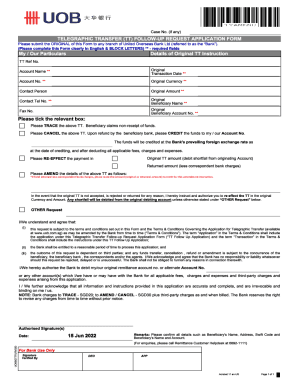
*if fund returned less correspondent bank charges, please state the amount (original or returned amount) to remit for this amendment instruction.
Open form follow the instructions
Easily sign the form with your finger
Send filled & signed form or save
How to fill out the SG UOB Telegraphic Transfer (TT) Follow-Up Request Application Form online
Filling out the SG UOB Telegraphic Transfer (TT) Follow-Up Request Application Form online is a straightforward process that allows users to efficiently address telegraphic transfer inquiries. This guide will walk you through each step of the form, providing clarity and support throughout the process.
Follow the steps to complete your application form accurately.
- Click ‘Get Form’ button to obtain the form and open it in the editing interface.
- Start by entering your personal information in the designated fields, ensuring that all entered data is accurate and up-to-date.
- Provide the details of the telegraphic transfer you are inquiring about, including the reference number and date of the transfer.
- In the section requesting the amount, indicate either the original amount or the returned amount, specifying the corresponding charges if applicable.
- Review all the information you have entered for any errors or omissions. Double-check that all numerical values are correct.
- Once you have verified the accuracy of all information, proceed to save your changes. You can also download, print, or share the form as needed.
Complete your SG UOB Telegraphic Transfer Follow-Up Request Application Form online today!
Experience a faster way to fill out and sign forms on the web. Access the most extensive library of templates available.
Related content
by JF COGSWELL · 1967 · Cited by 7 — Follow-up of Counselor Attitude Toward...
First day to obtain Student Parking Request forms at Parking and Commuter Services...
applications on VAX-II/VMS that cannot be built on competitive 360/370's and...
Get answers to your most pressing questions about US Legal Forms API.
How to download MT103 from UOB Infinity?
From the top menu bar, go to Accounts > Account Activities. a) Search for the account transaction and click on it. b) Under “Download Attachment”, click to retrieve the MT103 acknowledgement copy.
How do I transfer money to an overseas account?
A money transfer company is usually the cheapest way to get money to someone overseas. The company can either move the money to the other person's bank account, or arrange for the person to collect the money in cash at a local branch or agent. You can transfer money: online, and pay using your credit card.
How to transfer money overseas using UOB?
All you need to do is: Login to your UOB internet banking portal. Click “Pay and Transfer”, then click on “Overseas Transfer.” Enter and submit the recipient's information as required by UOB along with their banking details. Select your account, enter the currency, and the amount you're to transfer.
How do I transfer money from my bank to an overseas bank?
Method #1: Making an International Wire Transfer Online Through the Bank Find the wire transfer page. ... Check your online transfer limit. ... Provide bank details. ... Enter the amount and currency type. ... Pay the processing fee. ... Find out how long it will take to arrive. ... Bring all banking data to the branch with you.
How do I add a payee to my UOB account?
Log in to UOB TMRW and select "Pay/Transfer". Tap on “Add payee or Biller” at the bottom of the screen. Tap on “Biller” and type biller name or “v” to select biller from the list. Enter the details and tap on “Next”.
Can I transfer money to international bank account online?
RemitNow is a secure online Foreign Outward Remittance platform provided by HDFC Bank, which enables you to transfer money globally from the comfort of your home and office. Sending foreign outward remittance is now as easy as transferring funds via RTGS/NEFT. Now send money abroad, and smiles too. Anytime, anywhere.
How to transfer money from UOB to bank of America?
ATM Insert UOB card and enter your PIN. Select “Other Transactions”. Select “Funds Transfer”. Select either “From Linked Current Account” or “From Linked Savings Account”. Select the account number to transfer from. Select “To Other Bank's Account”.
Use professional pre-built templates to fill in and sign documents online faster. Get access to thousands of forms.
If you believe that this page should be taken down, please follow our DMCA take down process here.