Loading
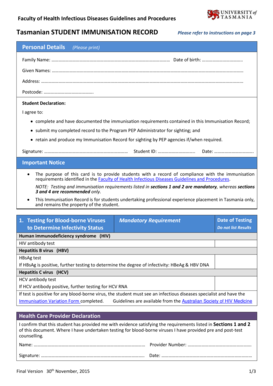
Get Au University Of Tasmania Tasmanian Student Immunisation Record 2015-2025
How it works
-

Open form follow the instructions
-

Easily sign the form with your finger
-

Send filled & signed form or save
How to fill out the AU University Of Tasmania Tasmanian Student Immunisation Record online
This guide provides comprehensive instructions on completing the AU University Of Tasmania Tasmanian Student Immunisation Record online. It is designed to assist users in accurately filling out each section of the form to ensure compliance with immunisation requirements.
Follow the steps to successfully complete the immunisation record.
- Press the ‘Get Form’ button to access the immunisation record in your online editor.
- Enter your personal details in the designated fields. This includes your family name, given names, address, date of birth, and student ID.
- Review the Student Declaration section. You must acknowledge your agreement to complete the immunisation requirements and provide your signature and the date.
- For the mandatory requirements, provide the dates of testing for blood-borne viruses. Note that results should not be included.
- Fill out the vaccine details, specifying the doses received for diphtheria, tetanus, pertussis, hepatitis B, measles, mumps, rubella, and varicella if applicable. Record the antibody levels for hepatitis B and the relevant serological results.
- Indicate your agreement to annual influenza vaccination under the recommended section, as well as your consent to TB screening with the tuberculin skin test.
- After completing all sections, ensure the health care provider's information is filled out, including their name, signature, provider number, and date.
- Once all information is correctly entered, you can save, download, print, or share your completed immunisation record as needed.
Complete your AU University Of Tasmania Tasmanian Student Immunisation Record online today to meet your immunisation requirements.
They can do this: online using their Medicare online account through myGov or the Medicare mobile app. by asking their vaccination provider to print it. by calling the Australian Immunisation Register.
Industry-leading security and compliance
US Legal Forms protects your data by complying with industry-specific security standards.
-
In businnes since 199725+ years providing professional legal documents.
-
Accredited businessGuarantees that a business meets BBB accreditation standards in the US and Canada.
-
Secured by BraintreeValidated Level 1 PCI DSS compliant payment gateway that accepts most major credit and debit card brands from across the globe.