Loading
Get Lions Clubs Pu101 2022-2026
How it works
-

Open form follow the instructions
-

Easily sign the form with your finger
-

Send filled & signed form or save
How to fill out the Lions Clubs PU101 online
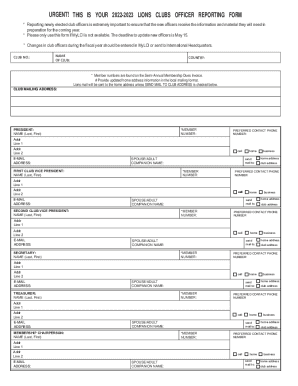
Filling out the Lions Clubs PU101 form accurately is essential for ensuring that newly elected club officers receive the necessary information and materials for the upcoming year. This guide provides a detailed, step-by-step approach to help you complete the form online with confidence.
Follow the steps to successfully fill out the PU101 form.
- Click ‘Get Form’ button to obtain the form and open it in the necessary editor.
- Begin by entering the club number in the designated field. This number is vital for identifying your specific club.
- Next, provide the name of the club, making sure to enter it correctly as it will be used in official documentation.
- Enter the country where the club is located. This information helps in sorting and managing clubs globally.
- Input the club mailing address. Ensure that it is in the correct local format, as Lions mail will be sent to this address unless otherwise indicated.
- Fill in the member number of the club president. If unsure, refer to the Semi-Annual Membership Dues Invoice.
- Provide the president's full name, ensuring to include their last name followed by their first name.
- Record the preferred contact phone number for the president, including the area code.
- Enter the email address for the president, as this will serve as their electronic signature when the form is submitted.
- Continue filling out the required fields for other officers, such as the first club vice president, second club vice president, secretary, and treasurer. Each of these sections will require a member number, full name, contact phone number, and email address.
- Complete additional officer information as needed, including roles like membership chairperson, club LCIF coordinator, and service chairperson.
- If there are updates to the club’s meeting information, fill this section out with the new details, including the schedule of meetings.
- Double-check all entered information for accuracy before submission.
- When ready to submit the form, certify that the information is correct by selecting the role (club president or secretary) and providing your name and member number.
- Submit the completed form via email to MemberServiceCenter@lionsclubs.org, including 'PU101' in the subject line, or print, sign, and fax or mail it as per the instructions provided.
Complete your Lions Clubs PU101 form online today to ensure your club officers are registered efficiently.
Register for MyLCI by creating a unique username and password. Click here to Register Now (you will need your LCI member number for authentication). Enter your username and password on the Logon page to access MyLCI and the Directory. Log in Now.