Get Au Form 14 Package 2020-2026
How it works
-

Open form follow the instructions
-

Easily sign the form with your finger
-

Send filled & signed form or save
How to fill out the AU Form 14 Package online
This guide provides clear and supportive instructions on how to complete the AU Form 14 Package online. Whether you are a first-time user or have some experience, you will find step-by-step guidance tailored to your needs.
Follow the steps to successfully complete the AU Form 14 Package
- Click ‘Get Form’ button to access the form and open it in your preferred editor.
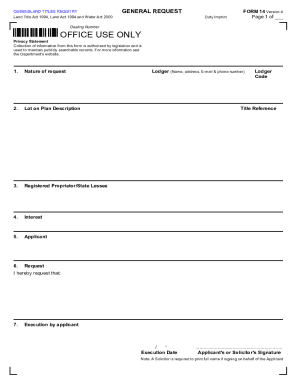
- Begin by entering the nature of your request in the appropriate field. Make sure to provide a clear and concise description of your request.
- Next, fill in the lot on plan description. This information is crucial and should accurately reflect the details of your property.
- Indicate the registered proprietor or state lessee's name. Ensure that the details match official records to avoid processing delays.
- Under the interest section, describe your interest in the property. Be as specific as possible to facilitate proper processing.
- Complete the applicant section by providing your name, address, and contact details. This ensures that you can be reached for any follow-up inquiries.
- Specify your request clearly in the corresponding field to ensure that your intentions are understood by the registry.
- In the execution section, sign the form with your signature and enter the execution date. If a solicitor is signing on your behalf, their full name must be printed.
- After completing the form, utilize the options available to save your changes, download a copy, print it for physical submission, or share the form as needed.
Complete your AU Form 14 Package online today for a streamlined experience.
Form 14 of the RTO must be filled out for each and every trainee that is enrolled in a particular driving school. It can be filled out using the following steps: In the first part fill in the year of the register. In the second part, you must fill in the enrollment number of the candidate. RTO Form 14: Driving School Registration Proof - LocoNav loconav.com https://loconav.com › vahan › rto-forms › rto-form-14 loconav.com https://loconav.com › vahan › rto-forms › rto-form-14