Loading
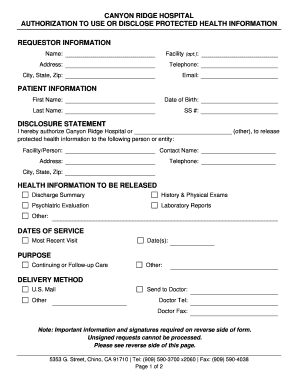
Get Ca Canyon Ridge Hospital Authorization To Use Or Disclose Protected Health Information
How it works
-

Open form follow the instructions
-

Easily sign the form with your finger
-

Send filled & signed form or save
How to use or fill out the CA Canyon Ridge Hospital Authorization To Use Or Disclose Protected Health Information online
Filling out the CA Canyon Ridge Hospital Authorization To Use Or Disclose Protected Health Information is a crucial step in managing your health data. This guide will take you through each section of the form, ensuring you understand how to complete it correctly and efficiently online.
Follow the steps to successfully fill out your authorization form.
- Press the ‘Get Form’ button to access the authorization form. It will open in your online editor for you to fill out.
- Begin with the requestor information section. Enter your name, facility (if applicable), address, telephone number, city, state, and zip code. This identifies who is requesting the information.
- Next, fill out the patient information. Provide the patient's first name, last name, date of birth, and Social Security number. This section is vital for correctly associating the authorization with the right individual.
- In the disclosure statement, authorize Canyon Ridge Hospital or an alternative entity to release the protected health information. Specify the name of the facility or person to whom the information will be sent, along with their contact name, address, telephone number, and city, state, and zip code.
- Proceed to the health information to be released section. Mark all applicable options, including discharge summary, history and physical exams, psychiatric evaluation, laboratory reports, and any other relevant information.
- Fill in the dates of service by providing the most recent visit date. If multiple dates apply, list them appropriately.
- In the purpose section, indicate why you are authorizing this disclosure, such as for continuing or follow-up care, or specify another purpose if needed.
- Choose the delivery method for the health information. Options may include U.S. mail or other methods. If sending to a doctor, provide their name, telephone number, and fax number as applicable.
- Note that your authorization will expire unless stated otherwise. You can specify a date, otherwise, it will expire 12 months from the date of signature.
- Finally, complete the signatures and acceptance section. Ensure the patient signs the form, printing their name and the date. If applicable, a parent, guardian, or legal representative must also sign, print their name, indicate the relationship, and date it.
- Once all fields are filled, ensure the form is free of errors. You can then save your changes, download, print, or share the completed form as needed.
Take control of your health information today by completing your forms online.
A Privacy Rule Authorization is an individual's signed permission to allow a covered entity to use or disclose the individual's protected health information (PHI) that is described in the Authorization for the purpose(s) and to the recipient(s) stated in the Authorization.
Industry-leading security and compliance
US Legal Forms protects your data by complying with industry-specific security standards.
-
In businnes since 199725+ years providing professional legal documents.
-
Accredited businessGuarantees that a business meets BBB accreditation standards in the US and Canada.
-
Secured by BraintreeValidated Level 1 PCI DSS compliant payment gateway that accepts most major credit and debit card brands from across the globe.