Loading
Get Za Nsfas Consent Form 2020-2026
How it works
-

Open form follow the instructions
-

Easily sign the form with your finger
-

Send filled & signed form or save
How to fill out the ZA NSFAS Consent Form online
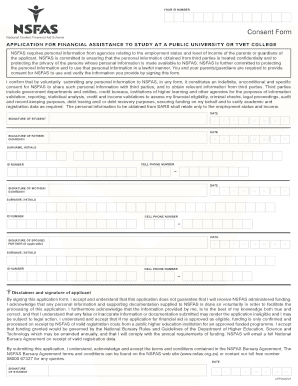
Filling out the ZA NSFAS Consent Form is a crucial step in your application for financial assistance to study at a public university or TVET college. This guide will provide you with clear instructions to help you complete the form online effectively.
Follow the steps to successfully complete the ZA NSFAS Consent Form online.
- Click the ‘Get Form’ button to access the ZA NSFAS Consent Form. This will open the form in your chosen online editing environment.
- Begin by entering your ID number in the designated field. This is essential for identifying your application.
- Next, you will need to provide consent signatures. Ensure you review the section regarding personal information sharing thoroughly.
- Fill in the date next to your signature. Make sure to use the appropriate format: year, month, and day.
- If applicable, provide your father’s guardian information, including their signature, surname, initials, ID number, and cell phone number.
- Repeat the process for your mother’s guardian information, ensuring all fields are correctly filled out.
- If you have a spouse or partner, include their details with a signature, surname, initials, ID number, and cell phone number, if necessary.
- Complete the disclaimer and signature section by reading it carefully. Sign and date this section to acknowledge your understanding and acceptance of the terms.
- Once all information is filled out, review the form to ensure accuracy and completeness, then save your changes.
- Finally, you may choose to download, print, or share the completed form as required.
Complete your ZA NSFAS Consent Form online today to take the next step in securing your financial assistance.
Visit the NSFAS website and download a copy of the application form pdf. Then, hand in your completed application form and supporting documents to the Financial Aid Office (FAO) at your University or FET college. Scan or email your completed application form and supporting documents to NSFAS at apply@nsfas.org.za.