Loading
Form preview
  • US Legal Forms
  • Other Templates
  • More Forms
  • More Multi-State Forms
  • Canada Pwgsc - Tpsgc 5116 2014

Get Canada Pwgsc - Tpsgc 5116 2014-2026

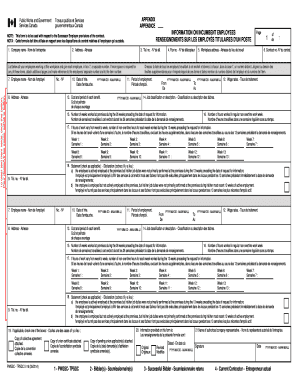
LES EMPLOY S TITULAIRES D'UN POSTE NOTE: This form is to be used with respect to the Successor Employer provisions of the contract. NOTA : Cette formule doit tre utilis e en rapport avec les dispositions du contrat relatives l'employeur qui succ de. 2. Address - Adresse 1. Company name - Nom de l'entreprise 3. Tel. no. - N de t l. List below all your employees working at this workplace and give each employee, in box 7, a separate number. If more space is required for any of these.

How it works

  1. Open form

    Open form follow the instructions

  2. Easily sign form

    Easily sign the form with your finger

  3. Share form

    Send filled & signed form or save

How to fill out the Canada PWGSC - TPSGC 5116 online

This guide provides a clear and supportive approach to completing the Canada PWGSC - TPSGC 5116 form online. By following these steps, you will effectively navigate through each section of the document, ensuring that all necessary information is accurately filled out.

Follow the steps to complete the Canada PWGSC - TPSGC 5116 online.

  1. Click the ‘Get Form’ button to obtain the form and open it in the online editor.
  2. Input your company name in the designated field. This is crucial for identifying the information with your business.
  3. Provide the company address in the next field, ensuring that the information accurately reflects your registered business location.
  4. Fill in the telephone number for your company. Include your fax number if applicable.
  5. List all employees working at your workplace in section seven. Assign a unique number to each employee for clarity.
  6. For each employee, provide their name and address.
  7. Enter the date of hire for each employee using the format YYYY-MM-DD.
  8. Indicate the period of employment for each employee, specifying both the start and end dates.
  9. Complete the sections regarding wage rates, job classification, and benefits, ensuring all entries are precise.
  10. Document the number of weeks worked at the premises during the preceding 26 weeks and regular hours worked in a week without overtime.
  11. If the hours vary from week to week, record the non-overtime hours for each week worked over the previous 13 weeks.
  12. Select the appropriate statement regarding employee job duties, ticking the relevant box.
  13. At the end of the form, sign as the authorized company representative and date your submission.
  14. Once completed, save your changes, download the form, and print or share as necessary.

Start completing your documents online today for ease and efficiency.

Get form

Experience a faster way to fill out and sign forms on the web. Access the most extensive library of templates available.
Get form

Related content

World-Wide Web Access Statistics for...
Jan 19, 1996 — World-Wide Web Access Statistics for scholar.lib.vt.edu. Totals for...
Learn more

Related links form

DoL CA-2a 2017 NV PA 201 SEC Form 144 (SEC 1147) GSA 3689 - Employee's Service Agreement For Receipt Of A Relocation Incentive

Questions & Answers

Get answers to your most pressing questions about US Legal Forms API.

Contact support

You can check company details in Canada by accessing databases managed by Canada PWGSC - TPSGC 5116. These resources offer comprehensive insights into registered businesses, including their compliance status and operational integrity. For a thorough analysis, consider using trusted business verification services available online that can guide you through the process safely.

To check Canadian company details, use the Canada PWGSC - TPSGC 5116 as a primary resource for registration data. Visit government websites that provide access to these records, where you can find information on a company’s status, legal filings, and more. Moreover, business directories can assist in uncovering additional context about the company’s operations.

To find detailed information about a company, start by searching governmental databases that include the Canada PWGSC - TPSGC 5116. You can also use online business registries that provide basic company profiles, including contact details and business structure. Additionally, reaching out to the company directly for specific queries can yield valuable insights.

The new name for public works and government services in Canada is the Canada PWGSC - TPSGC. This change reflects an effort to modernize and streamline government services, making them more accessible. If you're seeking services under this umbrella, you will find a range of options designed to better serve the community's needs.

Assessing a company's reputation involves looking at customer reviews and ratings available online. Utilize resources like the Better Business Bureau or consumer review sites to gather insights about the company’s practices. Also, check for any complaints filed with government agencies like Canada PWGSC - TPSGC 5116 to understand how they manage client relations. A good reputation is often reflected in consistent positive feedback.

To determine if a company is legitimate, start by checking their registration with the Canada PWGSC - TPSGC 5116. You can visit the official government website or business directories for verification. Additionally, consider contacting the company directly to ask specific questions about their services. This proactive approach helps ensure you engage with a credible entity.

To fill out an export declaration form, start by gathering information about your goods, including their value and destination. Complete all required sections accurately to prevent delays in processing. Familiarity with Canada PWGSC - TPSGC 5116 can ensure that your export complies with all legal standards, and using uslegalforms can guide you through this process.

Submitting an Employment Insurance (EI) report in Canada can be done online through the Service Canada portal. You need to provide accurate information about your employment status and any income received. Understanding Canada PWGSC - TPSGC 5116 will help you navigate the requirements for a successful report submission.

Filling a Canada representative form requires you to provide your personal information and details about your representative. Make sure to follow the specific instructions carefully to ensure compliance. You can find templates and support related to Canada PWGSC - TPSGC 5116 on platforms like uslegalforms to make the process easier.

To submit an access to information request in Canada, you need to complete a specific form and submit it to the appropriate government department. Ensure you include all required details to avoid delays. Remember, understanding the process under Canada PWGSC - TPSGC 5116 can be beneficial for a smooth submission.

Get This Form Now!

Use professional pre-built templates to fill in and sign documents online faster. Get access to thousands of forms.
Get form
If you believe that this page should be taken down, please follow our DMCA take down processhere.
Get Canada PWGSC - TPSGC 5116
Get form
  • Adoption
  • Bankruptcy
  • Contractors
  • Divorce
  • Home Sales
  • Employment
  • Identity Theft
  • Incorporation
  • Landlord Tenant
  • Living Trust
  • Name Change
  • Personal Planning
  • Small Business
  • Wills & Estates
  • Packages A-Z
  • Affidavits
  • Bankruptcy
  • Bill of Sale
  • Corporate - LLC
  • Divorce
  • Employment
  • Identity Theft
  • Internet Technology
  • Landlord Tenant
  • Living Wills
  • Name Change
  • Power of Attorney
  • Real Estate
  • Small Estates
  • Wills
  • All Forms
  • Forms A-Z
  • Other Templates
  • Legal Hub
  • About Us
  • Help Portal
  • Legal Resources
  • Blog
  • Affiliates
  • Contact Us
  • Delete My Account
  • Site Map
  • Industries
  • Forms in Spanish
  • Localized Forms
  • State-specific Forms
  • Forms Kit
  • Real Estate Handbook
  • All Guides
  • Notarize
  • Incorporation services
  • For Consumers
  • For Small Business
  • For Attorneys
  • USLegal
  • FormsPass
  • pdfFiller
  • signNow
  • altaFlow
  • DocHub
  • Instapage
Form Packages
  • Adoption
  • Bankruptcy
  • Contractors
  • Divorce
  • Home Sales
  • Employment
  • Identity Theft
  • Incorporation
  • Landlord Tenant
  • Living Trust
  • Name Change
  • Personal Planning
  • Small Business
  • Wills & Estates
  • Packages A-Z
Form Categories
  • Affidavits
  • Bankruptcy
  • Bill of Sale
  • Corporate - LLC
  • Divorce
  • Employment
  • Identity Theft
  • Internet Technology
  • Landlord Tenant
  • Living Wills
  • Name Change
  • Power of Attorney
  • Real Estate
  • Small Estates
  • Wills
  • All Forms
  • Forms A-Z
  • Other Templates
Customer Service
  • Legal Hub
  • About Us
  • Help Portal
  • Legal Resources
  • Blog
  • Affiliates
  • Contact Us
  • Delete My Account
  • Site Map
  • Industries
  • Forms in Spanish
  • Localized Forms
  • State-specific Forms
  • Forms Kit
Legal Guides
  • Real Estate Handbook
  • All Guides
Prepared for you
  • Notarize
  • Incorporation services
Our Customers
  • For Consumers
  • For Small Business
  • For Attorneys
Our Sites
  • USLegal
  • FormsPass
  • pdfFiller
  • signNow
  • altaFlow
  • DocHub
  • Instapage
Social Media
Call us now toll free:
+1 833 426 79 33
As seen in:
© Copyright 1999-2026 airSlate Legal Forms, Inc. 17 Station Street, Ste. 203, Brookline, MA 02445
  • Your Privacy Choices
  • Terms of Service
  • Privacy Notice
  • Content Takedown Policy
  • Bug Bounty Program