Loading
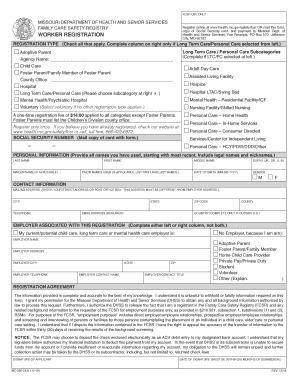
Get Mo 580-2421 2018
How it works
-

Open form follow the instructions
-

Easily sign the form with your finger
-

Send filled & signed form or save
How to fill out the MO 580-2421 online
Filling out the MO 580-2421 form online is a critical step for individuals seeking registration in the Family Care Safety Registry in Missouri. This comprehensive guide will walk you through the process, ensuring clarity and ease for all users.
Follow the steps to successfully complete the MO 580-2421 form.
- Use the ‘Get Form’ button to access the online form. This will allow you to open and fill out the MO 580-2421 in your digital workspace.
- Begin with the registration type section. Check at least one box that best describes your worker category from the options provided, such as Adoptive Parent or Long Term Care/Personal Care. If you select Long Term Care/Personal Care, be sure to also choose an appropriate subcategory from the adjoining list.
- Provide your Social Security number. It is mandatory to include a photocopy of your Social Security card along with the registration form when submitted.
- Fill in your personal information accurately. Include your last name, first name, middle name, and any suffix. Additionally, list any prior names you have used, including maiden names and nicknames.
- Complete the contact information section. Enter your mailing address, city, state, ZIP code, and county. Ensure that you provide a valid email address, as this will be used for communication regarding your registration.
- If you are associated with an employer, you can indicate that in the employer section by filling in the employer's name, address, city, and contact information. If you are not currently employed in the specified categories, choose the appropriate option from the list provided.
- Review the registration agreement. Ensure that all information provided is complete and accurate to the best of your knowledge. By signing the form, you authorize the necessary background checks.
- After completing the form, follow the instructions on how to submit it. You will need to send the completed registration form, a photocopy of your Social Security card, and payment to the specified address.
- Finally, save your completed form digitally, or print it for your records. Ensure that you have access to the necessary confirmations of submission.
Complete your registration in the Family Care Safety Registry online today.
Get form
Experience a faster way to fill out and sign forms on the web. Access the most extensive library of templates available.
Families and other employers may contact the Registry to obtain a background screening on registered individuals, at no cost, by calling the toll-free call center or by mailing, faxing, or emailing the signed form Document. Eligible providers may request background screenings via a secure internet account.
Get This Form Now!
Use professional pre-built templates to fill in and sign documents online faster. Get access to thousands of forms.