Loading
Get Omb 0970-0085
How it works
-

Open form follow the instructions
-

Easily sign the form with your finger
-

Send filled & signed form or save
How to fill out the OMB 0970-0085 online
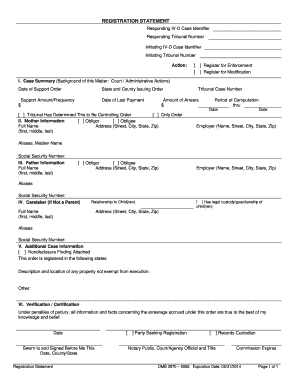
Filling out the OMB 0970-0085 Registration Statement is an essential step for registering existing child support orders for enforcement and modification. This guide provides a clear, step-by-step approach to assist you in completing the form accurately and efficiently online.
Follow the steps to complete the Registration Statement effectively.
- Click ‘Get Form’ button to obtain the form and open it in the editor.
- In the heading/caption section, input the Responding IV-D case identifier and Tribunal number if available. Ensure the IV-D case identifier is 15 characters, uppercase, and does not include asterisk or backslash. Specify the Initiating IV-D case identifier and tribunal number following the same format.
- Indicate your action by selecting the appropriate box for either registering for Enforcement or Modification. Ensure that the right accompanying documents (Transmittal #1, Uniform Support Petition, etc.) are included based on your choice.
- In Section I, Case Summary, provide all relevant information concerning the court or administrative actions regarding support. Clearly state the Date of Support Order, State and County issuing the order, Support Amount, Date of Last Payment, Tribunal Case Number, and Amount of Arrears. Specify the Period of Computation dates and check the appropriate boxes regarding the controlling order.
- Proceed to Section II, Mother Information. Check the corresponding box to indicate if the mother is the obligor or obligee. Fill in her full name, address, and employer details. Be sure to include any aliases and the Social Security Number, while ensuring confidentiality if a nondisclosure finding exists.
- In Section III, Father Information, provide the same level of detail for the father as in Section II for the mother, ensuring to indicate if he is the obligor or obligee and provide all necessary identifying details.
- Section IV is for the caretaker's information if they are not a parent. List the relationship to the children, full name, address, and the Social Security Number if applicable.
- In Section V, Additional Case Information, add any further information that may assist the responding jurisdiction. This includes previously registered states, property descriptions, and any other relevant details.
- Complete Section VI, Verification/Certification, by indicating who is signing the form, whether it is the party seeking registration or an authorized representative. Ensure to obtain a notary signature if required.
- After completing the form, review all entries for accuracy. Save your changes, and download, print, or share the form as necessary.
Start completing your OMB 0970-0085 Registration Statement online today!
Keeping detailed receipts for child support can help track expenses related to your child’s needs. Focus on expenses such as medical bills, education costs, and any direct contributions to your child’s welfare. Utilizing guidance from OMB 0970-0085 can help clarify what qualifies as necessary expenses for your records.