Loading
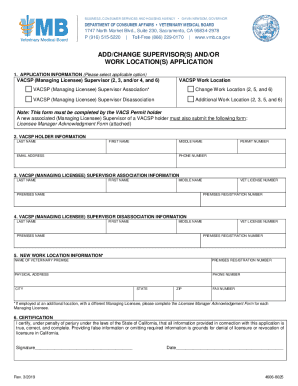
Get Ca Vacsp (managing Licensee) Supervisor Association/disassociation Application 2019-2026
How it works
-

Open form follow the instructions
-

Easily sign the form with your finger
-

Send filled & signed form or save
How to fill out the CA VACSP (Managing Licensee) Supervisor Association/Disassociation Application online
Filling out the CA VACSP (Managing Licensee) Supervisor Association/Disassociation Application online is an essential process for notifying changes in veterinary supervision. This comprehensive guide will walk you through each step, ensuring you provide accurate information and meet all requirements.
Follow the steps to complete the application with ease.
- Click ‘Get Form’ button to obtain the CA VACSP application and open it in your designated editor.
- Begin filling out the application information section. Here you will select the applicable option, such as 'VACSP (Managing Licensee) Supervisor Association' or 'VACSP (Managing Licensee) Supervisor Disassociation'. Make sure to select all that apply based on your specific situation.
- In the VACSP holder information section, provide your last name, first name, middle name, email address, permit number, and phone number. This information identifies you as the permit holder.
- In the supervisor association information section, fill in the new supervisor's last name, first name, middle name, premises name, veterinarian license number, and premises registration number. This section confirms the supervisor you are associating with.
- If applicable, complete the supervisor disassociation information by providing the last name, first name, middle name, premises name, veterinarian license number, and premises registration number of the supervisor you are disassociating from.
- In the new work location information section, provide the name of the veterinary premise, the premises registration number, physical address, phone number, city, state, ZIP code, and fax number if available. This information outlines the new location.
- In the certification section, read the declaration carefully. Sign and date the form indicating that all information provided is true and complete. This ensures legal compliance and accuracy.
- Once you have filled out all applicable sections, review the form for accuracy. You can then save changes, download, print, or share the completed application as needed.
Complete your CA VACSP application online today to ensure compliance and maintain your veterinary practices smoothly.
How do I apply for a VACSP? Link to BreEZe (or link to .vmb.ca.gov to file a paper application) to apply for a VACSP. Please note: If you submit your application online using BreEZe, the processing times are quicker because payments are able to be processed upon submittal of your application.