Loading
Get Delgado Community College Transfer Student Reference Sheet 2021-2026
How it works
-

Open form follow the instructions
-

Easily sign the form with your finger
-

Send filled & signed form or save
How to fill out the Delgado Community College Transfer Student Reference Sheet online
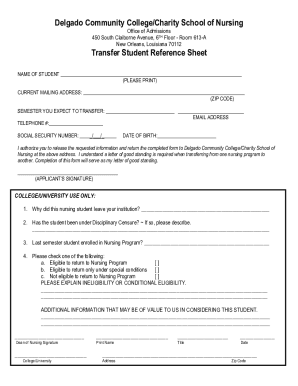
This guide provides a clear and supportive approach to filling out the Delgado Community College Transfer Student Reference Sheet online. Follow these steps to ensure your application is accurately completed.
Follow the steps to successfully complete your reference sheet
- Press the ‘Get Form’ button to obtain the form and open it for editing.
- In the first section, print your name clearly as the student applying for transfer.
- Provide your current mailing address, including the ZIP code, ensuring it is accurate for correspondence purposes.
- Indicate the semester you expect to transfer by filling in the relevant details in the designated fields.
- Enter your email address and telephone number so that the admissions office can contact you if needed.
- Fill in your Social Security number in the provided format to facilitate record-keeping.
- Input your date of birth to verify your identity as part of the application process.
- Sign in the designated area to authorize the release of your information and confirm that this form will act as your letter of good standing.
- Review the section marked for college/university use only and provide any relevant information required, such as reasons for leaving the previous institution and eligibility status.
- Ensure that the Dean of Nursing or authorized personnel completes their part of the form, including their signature, name, title, and date.
- After reviewing all entries for accuracy, save any changes made, and consider downloading, printing, or sharing the completed form as needed.
Complete your Delgado Community College Transfer Student Reference Sheet online today!
View an Unofficial Academic Transcript Log into LoLA (Delgado's online student portal) Select Student (upper left hand corner) Select Unofficial Transcript (Located in Academic Links Block) Click submit.