How it works
  • Open form

    Open form follow the instructions

  • Easily sign form

    Easily sign the form with your finger

  • Share form

    Send filled & signed form or save

How to fill out the Northwest Arkansas Community College Transcript Request Form online

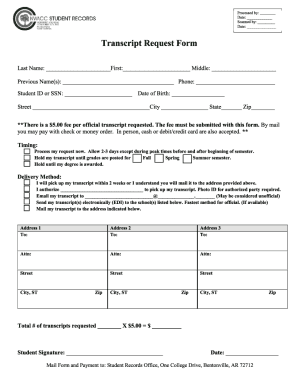
Filling out the Northwest Arkansas Community College Transcript Request Form online is a straightforward process that ensures you can request your academic transcript efficiently. This guide provides step-by-step instructions to help you complete the form accurately and easily.

Follow the steps to fill out your transcript request form online.

  1. Click the ‘Get Form’ button to access the form and open it in your preferred digital document processor.
  2. Provide your personal information in the designated fields. This typically includes your full name, date of birth, student identification number, and contact details.
  3. Indicate the type of transcript you are requesting. You may have options such as official or unofficial transcripts. Select the appropriate option based on your needs.
  4. If applicable, fill in the section for the recipient’s details. Input the name and address of the institution or person to whom the transcript should be sent.
  5. Review any additional instructions or requirements listed on the form, such as providing a signature or date.
  6. Once all fields are completed, carefully review your entries for accuracy and completeness.
  7. After confirming the information, you can save changes, download, print, or share the form as needed.

Submit your completed Northwest Arkansas Community College Transcript Request Form online to ensure your request is processed promptly.

Get form

Experience a faster way to fill out and sign forms on the web. Access the most extensive library of templates available.

Related content

GED Record Request Online Form

What You Need to Know · Before You Test · Testing Centers · Avoid Fraud ·...

Learn more
Transcript Request - NorthWest Arkansas Community...

Log into your My NWACC account; Select Student Records; Select Transcript request and...

Learn more
Institutional Catalog | Western Governors...

Jun 6, 2018 — Send in official transcripts. Provide a high school degree, GED or...

Learn more
Questions & Answers

Get answers to your most pressing questions about US Legal Forms API.

Contact support

How do I get my record transcript?

To get an official copy of your transcript, contact your school's registrar. In most cases, you don't even have to call or go in person; the registrar's office may have an online form for requesting your transcript. You can usually pay the transcript fee online too.

Both current and former students can request transcripts online via ACES. Current students can access web services at the top left corner of their 'Student' page.... Type (list to choose from) Designated 'Attention to' or department. Physical address with city and state. Email (when PDF option is utilized)

Go to the EvCC legacy transcript page....Requesting Transcripts from EvCC By Fax to 1-703-742-4238. Scan and email form to transcripts@studentclearinghouse.org. Attachment must be a GIF, JPEG, BMP or TIFF. Mail signed form to: National Student Clearinghouse. 2300 Dulles Station Boulevard, Suite 300. Herndon, VA 20171.

Note: You can submit unofficial transcripts by uploading documents to the Drop Box at https://api.nwacc.edu/lss/finaid/filedropbox/. You will need your NWACC username and password to access the Drop Box.

Official Transcripts Log into your My NWACC account. Select Student Records. Select Transcript request and follow the steps listed on that page.

Log into your Web-Gate account (using your student ID and password). Once you have successfully logged in, click the Student Tab near the top left corner of the page. Click on View Student Records. Click on Request Official Transcript. Follow the provided instructions to complete your order.

Login to your myAims account. Once logged in, select 'Grades & Academic Records,' then 'Order Transcript' at the bottom of the page....Transcripts Parchment Video for Transcript Services. Parchment Chat Option. Reach out to Parchment Support at 847-716-3005. Contact Support (force.com) - submit a support case.

Get This Form Now!

Use professional pre-built templates to fill in and sign documents online faster. Get access to thousands of forms.

If you believe that this page should be taken down, please follow our DMCA take down process here.

Get Northwest Arkansas Community College Transcript Request Form