Loading
Get Co Iml-4 2016-2026
How it works
-

Open form follow the instructions
-

Easily sign the form with your finger
-

Send filled & signed form or save
How to fill out the CO IML-4 online
Filling out the CO IML-4 form online can be a straightforward process if you follow the correct steps. This guide provides clear instructions to help you complete the application accurately and efficiently.
Follow the steps to complete the CO IML-4 application seamlessly.
- Click ‘Get Form’ button to obtain the form and open it in the editor.
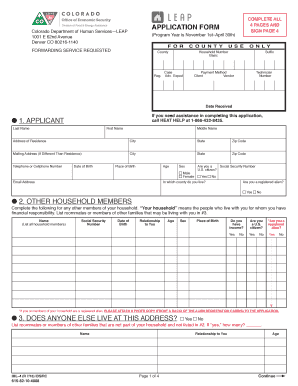
- Begin by entering your information as the applicant in section 1. Provide your last name, first name, middle name, address of residence, and contact details. Make sure to include your date of birth, place of birth, and Social Security number. Indicate whether you are a U.S. citizen and provide your email address.
- In section 2, list all other household members living with you. For each member, provide their name, Social Security number, date of birth, relationship to you, age, sex, and place of birth. Indicate if they have income and if they are a U.S. citizen or registered alien.
- Section 3 asks if anyone else lives at your address who is not part of your household. Answer yes or no and provide the necessary details if yes.
- Proceed to section 4 to report household income. This section will require you to indicate any work income, self-employment income, and non-work income. Provide details on amounts and frequency of payments, and ensure you attach the necessary documentation as requested.
- In section 5, describe your living arrangements. Select the type of dwelling and indicate if you rent or own. Provide information regarding your monthly rent or mortgage payments.
- Section 6 requires information about subsidized housing. Indicate if you live in Section 8 or public housing.
- In section 7, report any heating fuel emergencies you may currently be experiencing. Check the appropriate box and provide the necessary details.
- In section 8, provide a readable copy of a valid identification as proof of lawful presence. Complete and sign the affidavit located in this section.
- Section 9 gathers additional information that is not used for eligibility but may be beneficial for statistics. Check boxes where applicable.
- In section 10, consent to disclose customer data by your utility provider, if applicable. Review the terms and provide your signature in section 11 along with the date.
- Once all sections are filled out, review your form for accuracy. Make any necessary changes, then save your changes. You can download, print, or share the form as required.
Complete your CO IML-4 application online today for efficient processing.
Households can apply for LIHWAP as a joint application for LIHEAP. public assistance programs in the state's intake centers. Colorado's LIHWAP provides a one-time benefit payment for a maximum benefit amount of $2,000.