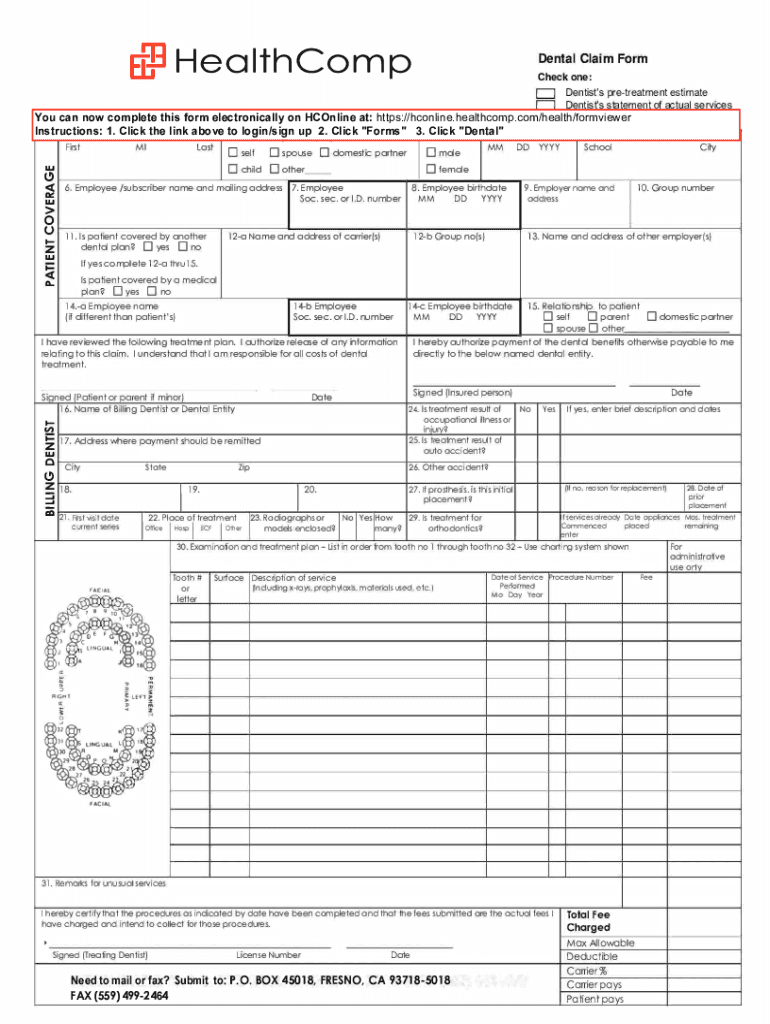
HealthCornpDental Claim Form Check one D DDentist's pretreatment estimate Dentist's statement of actual servicesSUBMIT TO: P.O. FRESNO, CA 937185018 (800) 4427247 You can Claim now complete this.
Loading

Open form follow the instructions

Easily sign the form with your finger

Send filled & signed form or save
How to fill out the HealthComp Dental Claim Form online
Filling out the HealthComp Dental Claim Form online can ensure a smooth process for your dental claims. This guide will walk you through each section of the form, providing clear instructions that suit all users, regardless of their experience.
Follow the steps to accurately complete the form
- Click ‘Get Form’ button to obtain the form and open it in your preferred online editor.
- In the first section, check the appropriate box to indicate whether you are submitting a dentist's pre-treatment estimate or a statement of actual services.
- Fill out the patient details including their full name, birth date, relationship to the employee (self, child, spouse, or domestic partner), and sex.
- Provide the employee's name, birth date, and social security or identification number, which may differ from the patient's details.
- Indicate whether the patient is covered by another dental plan by checking 'Yes' or 'No' and provide the name and address of the other carrier if applicable.
- Complete the sections regarding treatment information, which include the billing dentist's details, place of treatment, and any special remarks regarding services provided.
- List all procedures performed by tooth number using the specified charting system, including detailed descriptions and dates.
- Sign the form to authorize the release of information related to the claim and confirm your responsibility for the costs of dental treatment.
- Once all sections are completed, review the form for accuracy, then save your changes, and prepare to print or share the form as needed.
Complete your dental claims process online today!
Experience a faster way to fill out and sign forms on the web. Access the most extensive library of templates available.
Related content
Dental Claim Form. Check one: Dentist's pre-treatment estimate. Dentist's statement of...
MEDICAL CLAIM FORM. P.O. Box 45018, Fresno, CA 93718-5018. For questions, call:...
Aug 9, 2017 — Claims are printed and mailed to the payer. ... Argus Dental Plans...
Get answers to your most pressing questions about US Legal Forms API.
What is the payer ID for HealthComp North?
Click here for more info!
Where do I send my HealthComp claim?
Locations HealthComp West. 621 Santa Fe. Fresno, CA 93721. HealthComp North. 18861 S 90th Ave # A. Mokena, IL 60448. HealthComp South. 2100 Covington Centre, Suite B Covington, LA 70433. Pennsylvania (Significa Benefit Services) P.O. Box 7777. Lancaster, PA 17604. ... West Virginia (Benefits Assistance Company) 3556 Teays Valley Road.
What type of insurance is HealthComp?
HealthComp is a third party administrator (TPA) committed to making access to healthcare easier, more affordable, and simpler for everyone involved. We provide customized full service offerings including but not limited to: Medical. Dental.
What is the mission statement of the HealthComp?
The mission of the HealthComp Foundation is to accelerate a healthy community and advance equity through partnerships and investment. Our vision is to foster a future norm where healthcare collaboration promotes health equity in our community.
Who owns HealthComp?
HealthComp – New Mountain Capital.
What kind of insurance is HealthComp?
HealthComp is a third party administrator (TPA) committed to making access to healthcare easier, more affordable, and simpler for everyone involved. We provide customized full service offerings including but not limited to: Medical. Dental.
Use professional pre-built templates to fill in and sign documents online faster. Get access to thousands of forms.
If you believe that this page should be taken down, please follow our DMCA take down process here.