Loading
Get Canada 82-0666 E 2016-2026
How it works
-

Open form follow the instructions
-

Easily sign the form with your finger
-

Send filled & signed form or save
How to fill out the Canada 82-0666 E online
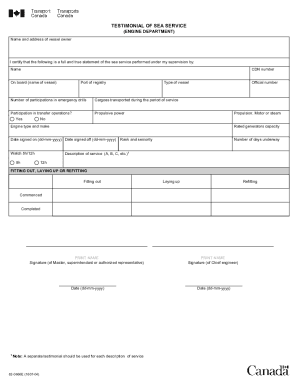
The Canada 82-0666 E form is essential for documenting sea service performed under supervision in the engine department. This guide provides a clear and supportive approach to help users fill out the form accurately and effectively.
Follow the steps to complete the Canada 82-0666 E form online.
- Click ‘Get Form’ button to obtain the form and open it for editing.
- Begin by filling in the name and address of the vessel owner at the top of the form. Ensure this information is accurate, as it is crucial for verification.
- Enter the name and CDN number of the person for whom the sea service is being certified. Make sure to include the name of the vessel and its port of registry.
- Select the type of vessel being referenced in this testimonial. This information helps outline the context of the sea service provided.
- Indicate the number of participations in emergency drills that the individual completed during their service period.
- List the cargoes transported during the service period to provide a clear record of the responsibilities undertaken.
- Respond to the question about participation in transfer operations by selecting 'Yes' or 'No' accordingly.
- Document the propulsive power and specify whether it is motor or steam, alongside the engine type and make.
- Provide the rated generators capacity for the vessel's engine, which can indicate the operational capabilities during the service.
- Fill in the dates signed on and signed off, formatted as dd-mm-yyyy, to define the service duration clearly.
- Select either 8-hour or 12-hour watch based on the watchkeeping structure followed during the service.
- State rank and seniority along with the number of days the individual was underway, ensuring accuracy here is vital.
- Provide a description of service by marking it with the corresponding letters (A, B, C, etc.) to denote different service descriptions.
- Indicate whether the vessel was being fitted out, laid up, or refitted, and fill in the commenced and completed date fields.
- Print the name and acquire the signature of the Master, superintendent, or authorized representative, followed by the Chief engineer's details and signature.
- Finally, review all entries for completeness and accuracy, and ensure all dates are formatted correctly before submitting the form.
- Once all sections are filled out, users can save changes, download, print, or share the completed form as needed.
Complete your Canada 82-0666 E form online today for a seamless submission process.