Loading
Form preview
  • US Legal Forms
  • Other Templates
  • More Forms
  • More Multi-State Forms
  • Au Clc Permission Request Health & Travel Declaration 2022

Get Au Clc Permission Request Health & Travel Declaration 2022-2026

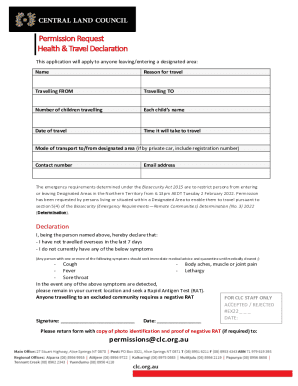
Permission Request Health & Travel Declaration This application will apply to anyone leaving entering a designated area: NameReason for travelTravelling FROMTravelling TON umber of children travellingEach.

How it works

  1. Open form

    Open form follow the instructions

  2. Easily sign form

    Easily sign the form with your finger

  3. Share form

    Send filled & signed form or save

How to fill out the AU CLC Permission Request Health & Travel Declaration online

This guide provides a clear and concise overview of how to complete the AU CLC Permission Request Health & Travel Declaration online. Designed for users traveling to or from designated areas, this document ensures compliance with current biosecurity requirements.

Follow the steps to complete the form accurately.

  1. Press the ‘Get Form’ button to access the AU CLC Permission Request Health & Travel Declaration and open it in your editor.
  2. Begin by entering your full name in the designated field. Ensure that the name matches the identification documents you will submit.
  3. Provide the reason for your travel. Be clear and precise to facilitate the approval process.
  4. Indicate where you are traveling from in the 'Travelling FROM' section. Fill this out accurately, including any specific locations.
  5. In the 'Travelling TO' section, specify your destination. This is crucial for processing your request.
  6. Enter the number of children traveling with you, followed by each child’s name in the corresponding fields to ensure all travelers are accounted for.
  7. Fill in the date of travel. Use the calendar feature if available to avoid errors in dates.
  8. Estimate the time it will take to travel. This helps authorities understand the nature of your journey.
  9. Select your mode of transport to and from the designated area. If using a private car, include the registration number as requested.
  10. Provide a contact number where you can be reached during your travel period. Ensure this number is correct and accessible.
  11. Enter your email address for correspondence regarding your application.
  12. Read through the declaration section and confirm that you meet the health requirements outlined, such as not having traveled overseas recently or exhibiting symptoms.
  13. If applicable, sign and date the form at the bottom section, ensuring you include a valid photo identification and proof of a negative Rapid Antigen Test if required.
  14. Once completed, save the changes and prepare to submit the form. You can then download, print, or share the form as needed.

Complete your AU CLC Permission Request Health & Travel Declaration online today for a smooth travel experience.

Get form

Experience a faster way to fill out and sign forms on the web. Access the most extensive library of templates available.
Get form

Related content

AU-2 Guidelines for Command (Second edition) - Air...
Air University (U.S.). Air Command and Staff College. AU-2 guidelines for command : a...
Learn more
Advisory Committee on Trademarks & Licensing
CLC is responsible for ensuring companies that sign contracts to manufacture products...
Learn more
MCO 4400.150 LPC-2 - Marines.mil
Jan 29, 2014 — DISTRIBUTION STATEMENT A: Approved for public release; ... request...
Learn more

Related links form

Plagiarism Form 2020 Pony Club Grassroots Dressage Test 2018 2020 Physical Examination Record For Foreigner 2020 Download United-india Contractors-Plant-and-Machinery Proposal-form Download United-india 2020

Get This Form Now!

Use professional pre-built templates to fill in and sign documents online faster. Get access to thousands of forms.
Get form
If you believe that this page should be taken down, please follow our DMCA take down processhere.
Get AU CLC Permission Request Health & Travel Declaration
Get form
  • Adoption
  • Bankruptcy
  • Contractors
  • Divorce
  • Home Sales
  • Employment
  • Identity Theft
  • Incorporation
  • Landlord Tenant
  • Living Trust
  • Name Change
  • Personal Planning
  • Small Business
  • Wills & Estates
  • Packages A-Z
  • Affidavits
  • Bankruptcy
  • Bill of Sale
  • Corporate - LLC
  • Divorce
  • Employment
  • Identity Theft
  • Internet Technology
  • Landlord Tenant
  • Living Wills
  • Name Change
  • Power of Attorney
  • Real Estate
  • Small Estates
  • Wills
  • All Forms
  • Forms A-Z
  • Other Templates
  • Legal Hub
  • About Us
  • Help Portal
  • Legal Resources
  • Blog
  • Affiliates
  • Contact Us
  • Delete My Account
  • Site Map
  • Industries
  • Forms in Spanish
  • Localized Forms
  • State-specific Forms
  • Forms Kit
  • Real Estate Handbook
  • All Guides
  • Notarize
  • Incorporation services
  • For Consumers
  • For Small Business
  • For Attorneys
  • USLegal
  • FormsPass
  • pdfFiller
  • signNow
  • altaFlow
  • DocHub
  • Instapage
Form Packages
  • Adoption
  • Bankruptcy
  • Contractors
  • Divorce
  • Home Sales
  • Employment
  • Identity Theft
  • Incorporation
  • Landlord Tenant
  • Living Trust
  • Name Change
  • Personal Planning
  • Small Business
  • Wills & Estates
  • Packages A-Z
Form Categories
  • Affidavits
  • Bankruptcy
  • Bill of Sale
  • Corporate - LLC
  • Divorce
  • Employment
  • Identity Theft
  • Internet Technology
  • Landlord Tenant
  • Living Wills
  • Name Change
  • Power of Attorney
  • Real Estate
  • Small Estates
  • Wills
  • All Forms
  • Forms A-Z
  • Other Templates
Customer Service
  • Legal Hub
  • About Us
  • Help Portal
  • Legal Resources
  • Blog
  • Affiliates
  • Contact Us
  • Delete My Account
  • Site Map
  • Industries
  • Forms in Spanish
  • Localized Forms
  • State-specific Forms
  • Forms Kit
Legal Guides
  • Real Estate Handbook
  • All Guides
Prepared for you
  • Notarize
  • Incorporation services
Our Customers
  • For Consumers
  • For Small Business
  • For Attorneys
Our Sites
  • USLegal
  • FormsPass
  • pdfFiller
  • signNow
  • altaFlow
  • DocHub
  • Instapage
Social Media
Call us now toll free:
+1 833 426 79 33
As seen in:
© Copyright 1999-2026 airSlate Legal Forms, Inc. 17 Station Street, Ste. 203, Brookline, MA 02445
  • Your Privacy Choices
  • Terms of Service
  • Privacy Notice
  • Content Takedown Policy
  • Bug Bounty Program