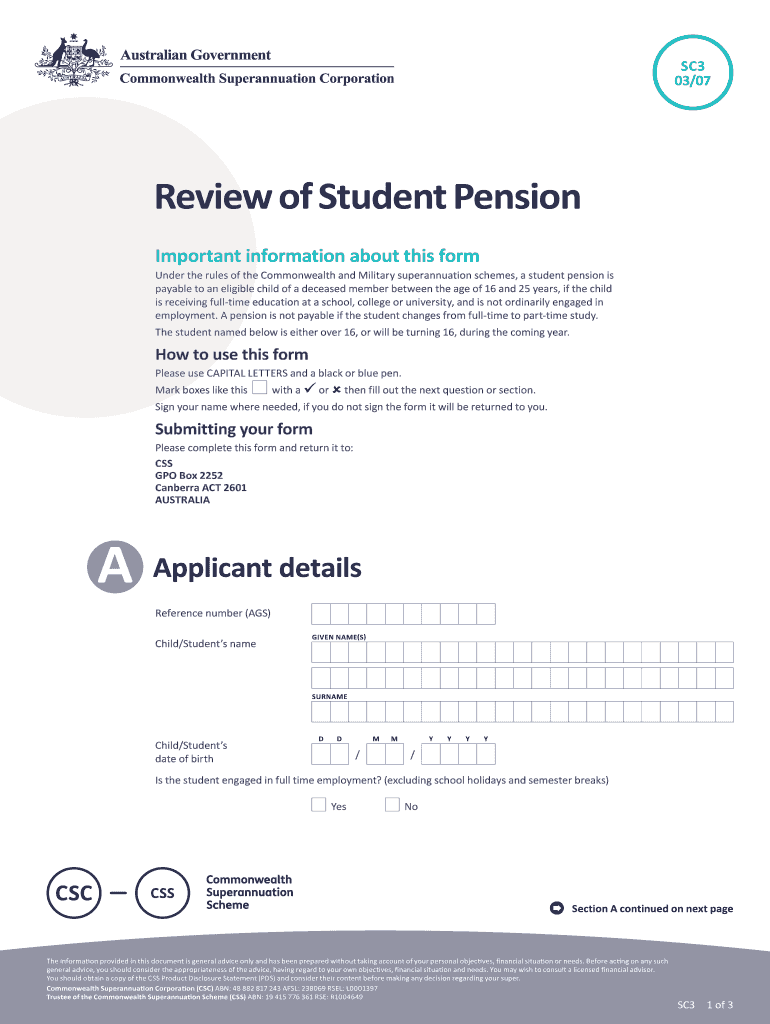
SC3 03/07Review of Student Pension Important information about this form Under the rules of the Commonwealth and Military superannuation schemes, a student pension is payable to an eligible child.
Loading

Open form follow the instructions

Easily sign the form with your finger

Send filled & signed form or save
How to fill out the AU SC3 online
Filling out the AU SC3 form is a crucial step for the eligible child of a deceased member to apply for a student pension. This guide provides a step-by-step approach to ensure accurate completion of the form to support your application effectively.
Follow the steps to fill out the AU SC3 form correctly.
- Click ‘Get Form’ button to access the AU SC3 form and open it in your preferred editor.
- Enter the applicant details in Section A. Provide the reference number (AGS), the child/student's given name(s), surname, and date of birth. Ensure to use capital letters for clarity.
- Answer the questions regarding the student’s employment status, whether they are engaged in full-time employment excluding school holidays. Mark 'Yes' or 'No' as appropriate.
- Indicate if the student is undertaking a cadetship, traineeship, or apprenticeship by marking ‘Yes’ or ‘No’.
- Confirm if this is expected to be the student’s final year of study by selecting 'Yes' or 'No'.
- In Section B, fill out the bank account details. Provide the name of the institution, account holder’s name, branch location, BSB number, and account number.
- Section C requires education details. Input the name and address of the school, college, or university, alongside the course type and whether it is full-time or part-time. Specify the duration of the course for the academic year.
- Obtain the necessary signature from the principal or registrar of the educational institution and ensure the stamp is affixed.
- In the Declaration section, sign as the parent, guardian, or carer, confirming that the provided information is accurate. Include the date signed and contact phone numbers.
- Once all sections are filled, save your changes, download, print, or share the completed form as required.
Complete the AU SC3 form online and submit it to ensure your eligibility for the student pension.
Experience a faster way to fill out and sign forms on the web. Access the most extensive library of templates available.
Related content
by K Scholtmeijer · 2009 · Cited by 56 — Class I hydrophobins function in fungal...
AU at a Glance. For God and humanity, Anderson University seeks to be an innovative...
BASIC Level III A (or BASIC Level 3 1.0) is a BASIC language cartridge for the SC-3000. It...
Get answers to your most pressing questions about US Legal Forms API.
How hot does a 1000 watt steam cleaner get?
Efficient Deep Cleaning: Designed with 1000W powerful motor, this chemical free steam cleaner with 2-3 bar work pressure features steam temperature up to 203°F for an optimal cleaning effect. It helps you remove all kinds of stains, dust and grease.
How hot does a 1500 watt steam cleaner get?
Product Overview. This steam cleaner heats up to 212° F to clean and sanitize almost any surface. Delivers up to 45 minutes of steam on a full tank of water.
What temperature do steam cleaners reach?
Residential units heat water up to temperatures between 150° and 300° Fahrenheit (66-149° Celsius). For example, Reliable steam cleaners typically have a steam tip temperature of 245° F. The hot steam kills dust mites, mold, mildew, viruses, and other allergens on contact as well as loosening most dirt and grime.
What is Karcher SC 3 used for?
It's great for removing tough grease from oven doors and hobs, everyday dirt from hard floors, stubborn stains from upholstery and carpets, and even limescale and mould from tiles and taps, leaving your home effortlessly sparkling with no chemicals or scrubbing.
How hot does a Kärcher steam cleaner get?
Temperature The steam leaves the nozzle at a tem perature of 100 °C. This heat allows the steam to loosen dirt quickly and easily. The secret of steam cleaning is based on the power ful combination of pressure, speed and temperature.
How hot does Karcher steam cleaner get?
Steam cleaners work by using low pressure steam (up to 150psi) and very high temperature steam (up to 360 deg F), which kills just about all bacteria, mold, and allergens that it passes over.
Use professional pre-built templates to fill in and sign documents online faster. Get access to thousands of forms.
If you believe that this page should be taken down, please follow our DMCA take down process here.