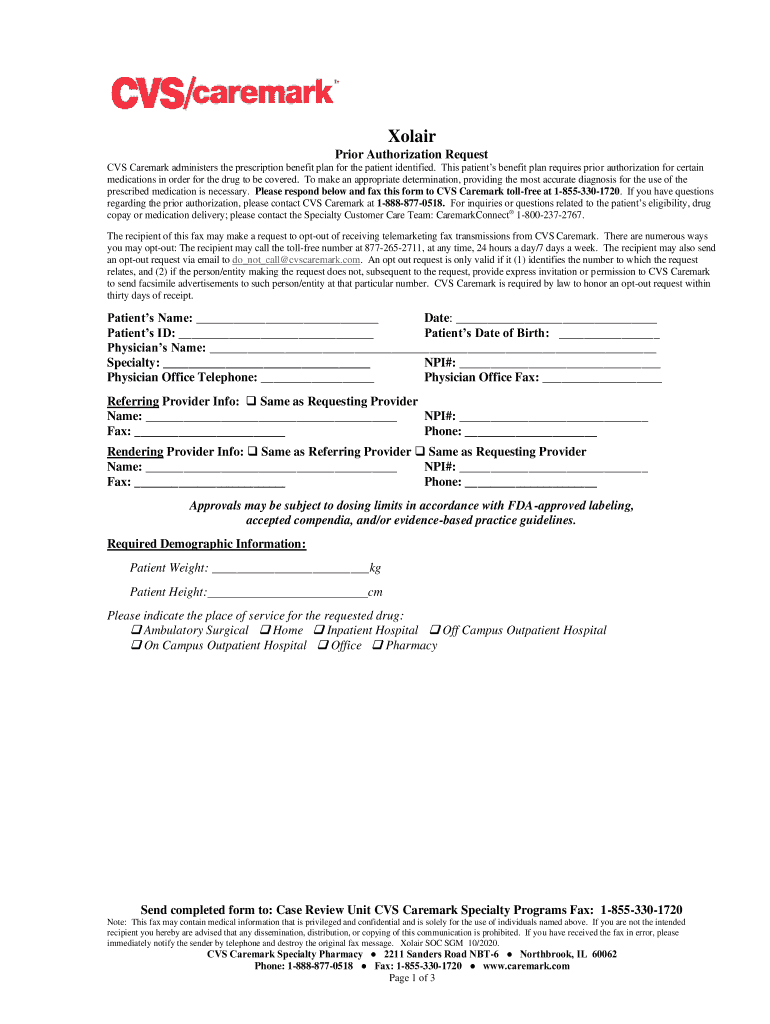
Prior Authorization Request CVS Caremark administers the prescription benefit plan for the patient identified. This patients benefit plan requires prior authorization for certain medications in order.
Loading

Open form follow the instructions

Easily sign the form with your finger

Send filled & signed form or save
How to fill out the CareFirst BCBS Prior Authorization Request online
Filling out the CareFirst BCBS Prior Authorization Request is an important step in securing coverage for necessary medications like . This guide will provide you with clear and detailed instructions to ensure the form is completed accurately online.
Follow the steps to successfully complete the request form.
- Press the ‘Get Form’ button to access the Prior Authorization Request form, which will open for you to fill out.
- Begin by entering the patient’s name, date, ID, and date of birth in the designated fields. This information is crucial for identifying the individual requesting the medication.
- Provide the physician’s name, specialty, NPI number, and contact information for the physician’s office. Ensure this information is accurate to avoid delays.
- If applicable, fill in the referring provider information, including their name and NPI number. You can select ‘Same as Requesting Provider’ if no additional information is needed.
- Complete the rendering provider information, again selecting ‘Same as Referring Provider’ or ‘Same as Requesting Provider’ if appropriate.
- Indicate the required demographic information including the patient's weight and height, which helps in medication dosage calculation.
- Select the appropriate place of service where the requested drug will be administered from the provided options.
- Answer the site of service questions carefully, ensuring that you check the corresponding boxes based on the patient's age and prior treatment history.
- Provide the clinical criteria information by selecting the proper diagnosis and associated ICD-10 code. Fill in any additional required sections based on the diagnosis, notably regarding asthma or chronic idiopathic urticaria.
- Finally, attest that all provided information is accurate and complete, and that supporting documentation is available for review if requested. Sign and date the form.
- Once all sections are filled, you can save changes, download the completed form, print it if needed, or share it with your practice as necessary.
Complete your CareFirst BCBS Prior Authorization Request online today to ensure timely access to your medication.
Experience a faster way to fill out and sign forms on the web. Access the most extensive library of templates available.
Related content
an authorization for a CareFirst employee, fax the request to (410) 505-2840. Please...
If you need help completing this form please call toll-free 1-800-853-9236. Please mail or...
BlueShield and CareFirst BlueChoice, Inc. (CareFirst) ... For costs and complete details...
Get answers to your most pressing questions about US Legal Forms API.
What is the phone number for CareFirst administrators md provider?
Please call CareFirst Administrators at 866-945-9839.
What is the phone number for CareFirst network leasing provider?
If you have additional questions, contact Provider Service at 877-228-7268.
What is Maryland CareFirst number?
Who do I contact? Answer: Please call CareFirst at 800-245-7013.
What is CareFirst local provider phone number?
If you have comments or questions, we want to help you. For technical support, call the CareFirst Help Desk at (877) 526 – 8390. Below is a list that may assist you with your CareFirst provider-related questions. Contact our Credentialing Department to become a participating provider.
What is a letter of medical necessity CareFirst?
Letter of medical necessity - This is a letter that must be signed by your doctor or eligible licensed health care provider to certify that the item or service is medically necessary.
What is the provider number for CareFirst BCBS of Maryland?
For technical support, call the CareFirst Help Desk at (877) 526 – 8390. Below is a list that may assist you with your CareFirst provider-related questions.
What is the fax number for CareFirst BCBS of Maryland?
Submit the request in one of the following ways: via fax to 443-552-7407 / 443-552-7408.
What is the payer ID for CareFirst of Maryland?
Electronically (preferred method) through our Clearinghouse, Change Healthcare (formerly Emdeon) – Payor ID 45281.
Use professional pre-built templates to fill in and sign documents online faster. Get access to thousands of forms.
If you believe that this page should be taken down, please follow our DMCA take down process here.