Loading
Form preview
  • US Legal Forms
  • Other Templates
  • More Forms
  • More Multi-State Forms
  • Uk Form Mr01 2016

Get Uk Form Mr01 2016-2026

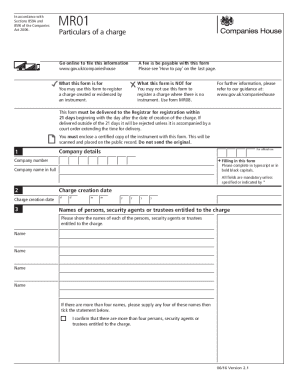
In accordance with Sections 859A and 859J of the Companies Act 2006.MR01Particulars of a chargeGo online to file this information www.gov.uk/companieshouseA fee is be payable with this form Please.

How it works

  1. Open form

    Open form follow the instructions

  2. Easily sign form

    Easily sign the form with your finger

  3. Share form

    Send filled & signed form or save

How to fill out the UK Form MR01 online

This guide provides clear instructions on how to complete the UK Form MR01 online, ensuring you can effectively register a charge created or evidenced by an instrument. Follow the step-by-step process for a smooth filing experience.

Follow the steps to successfully complete the UK Form MR01 online.

  1. Press the ‘Get Form’ button to access the UK Form MR01 and open it in the online editor.
  2. Complete the company details section by entering the company number and full company name in bold black capitals.
  3. Input the charge creation date by specifying the day, month, and year in the designated fields.
  4. List the names of persons, security agents, or trustees entitled to the charge. If there are more than four, provide any four names and check the appropriate confirmation box.
  5. Enter a brief description of the property subject to the charge in the available text field, limiting it to the space provided.
  6. Indicate if the instrument includes any charges over additional properties by ticking 'Yes' or 'No' in the appropriate section.
  7. If applicable, specify whether the instrument contains a floating charge by selecting 'Yes' or 'No.' Further, denote if the floating charge covers all the company's property.
  8. Answer whether any terms of the charge prevent the company from creating further security by selecting 'Yes' or 'No.'
  9. Tick the box if the company is acting as a trustee of the property or undertaking subject to the charge.
  10. Sign the form in the designated area to validate the submission. Make sure the signature is from a person with an interest in the charge.
  11. Optionally, provide presenter information for contact purposes, though it is not mandatory. This includes name, company name, and address.
  12. Review the checklist to ensure that all required sections are completed accurately before submission, including enclosures of the certified copy of the instrument.
  13. Once completed, you can save changes, download, print, or share the completed form as needed.

Start filling out your UK Form MR01 online today to ensure proper registration of your charge.

Get form

Experience a faster way to fill out and sign forms on the web. Access the most extensive library of templates available.
Get form

Related content

second amendment to credit agreement - Document
This SECOND AMENDMENT TO CREDIT AGREEMENT, dated as of July 28, 2021 (this “Second...
Learn more
A Comparison of the Handling of the Financial...
by EF Brown · 2010 · Cited by 36 — As a result, the agency hears from competing voices...
Learn more
Laserform Catalogue December 2013 CA110...
FS2 Fee sheet for: UK Designs, Patents, & Trade Marks forms and Patent ... MR01(C1) MR01...
Learn more

Related links form

How To Write A Recommendation Letter 2020 Eap Form 2 Excavation Permit Template 2020 Investment Solicitor

Questions & Answers

Get answers to your most pressing questions about US Legal Forms API.

Contact support

Company registrations for England and Wales are carried out in Cardiff. Registrations for Scotland and Northern Ireland are carried out in Edinburgh and Belfast. Our London office provides search services, and documents can be delivered here.

Register a charge ( MR01 ) A 'charge' is the security a company gives for a loan. For example, a mortgage is a type of charge. You can send us the details of a charge created by the company. We'll then register the charge on the company's public record.

All limited companies in the UK, and overseas companies with a branch or place of business in the UK need to be registered with Companies House.

Who can register a charge. Any person 'interested in the charge' can register a charge at Companies House. This could be the company itself, the lender or their agent. Use our online filing service to register your charge for a reduced fee of £15.

The registration process A charge must be registered by submitting a certified copy of the instrument creating or evidencing the charge to Companies House, together with a statement of the particulars of the charge. This obligation is complied with by submitting, in the case of a company, a Form MR01.

UK limited companies are incorporated (registered) in one of three UK jurisdictions – England & Wales, Scotland, or Northern Ireland. It is not possible to change a company's country of registration, so you cannot simply transfer a Scottish company to England in this respect.

All forms must be signed by a person with an interest in the charge i.e. they may be signed by the company, the lender or by a representative of the company or lender which includes Solicitors/Accountants.

Get This Form Now!

Use professional pre-built templates to fill in and sign documents online faster. Get access to thousands of forms.
Get form
If you believe that this page should be taken down, please follow our DMCA take down processhere.
Get UK Form MR01
Get form
  • Adoption
  • Bankruptcy
  • Contractors
  • Divorce
  • Home Sales
  • Employment
  • Identity Theft
  • Incorporation
  • Landlord Tenant
  • Living Trust
  • Name Change
  • Personal Planning
  • Small Business
  • Wills & Estates
  • Packages A-Z
  • Affidavits
  • Bankruptcy
  • Bill of Sale
  • Corporate - LLC
  • Divorce
  • Employment
  • Identity Theft
  • Internet Technology
  • Landlord Tenant
  • Living Wills
  • Name Change
  • Power of Attorney
  • Real Estate
  • Small Estates
  • Wills
  • All Forms
  • Forms A-Z
  • Other Templates
  • Legal Hub
  • About Us
  • Help Portal
  • Legal Resources
  • Blog
  • Affiliates
  • Contact Us
  • Delete My Account
  • Site Map
  • Industries
  • Forms in Spanish
  • Localized Forms
  • State-specific Forms
  • Forms Kit
  • Real Estate Handbook
  • All Guides
  • Notarize
  • Incorporation services
  • For Consumers
  • For Small Business
  • For Attorneys
  • USLegal
  • FormsPass
  • pdfFiller
  • signNow
  • altaFlow
  • DocHub
  • Instapage
Form Packages
  • Adoption
  • Bankruptcy
  • Contractors
  • Divorce
  • Home Sales
  • Employment
  • Identity Theft
  • Incorporation
  • Landlord Tenant
  • Living Trust
  • Name Change
  • Personal Planning
  • Small Business
  • Wills & Estates
  • Packages A-Z
Form Categories
  • Affidavits
  • Bankruptcy
  • Bill of Sale
  • Corporate - LLC
  • Divorce
  • Employment
  • Identity Theft
  • Internet Technology
  • Landlord Tenant
  • Living Wills
  • Name Change
  • Power of Attorney
  • Real Estate
  • Small Estates
  • Wills
  • All Forms
  • Forms A-Z
  • Other Templates
Customer Service
  • Legal Hub
  • About Us
  • Help Portal
  • Legal Resources
  • Blog
  • Affiliates
  • Contact Us
  • Delete My Account
  • Site Map
  • Industries
  • Forms in Spanish
  • Localized Forms
  • State-specific Forms
  • Forms Kit
Legal Guides
  • Real Estate Handbook
  • All Guides
Prepared for you
  • Notarize
  • Incorporation services
Our Customers
  • For Consumers
  • For Small Business
  • For Attorneys
Our Sites
  • USLegal
  • FormsPass
  • pdfFiller
  • signNow
  • altaFlow
  • DocHub
  • Instapage
Social Media
Call us now toll free:
+1 833 426 79 33
As seen in:
© Copyright 1999-2026 airSlate Legal Forms, Inc. 17 Station Street, Ste. 203, Brookline, MA 02445
  • Your Privacy Choices
  • Terms of Service
  • Privacy Notice
  • Content Takedown Policy
  • Bug Bounty Program