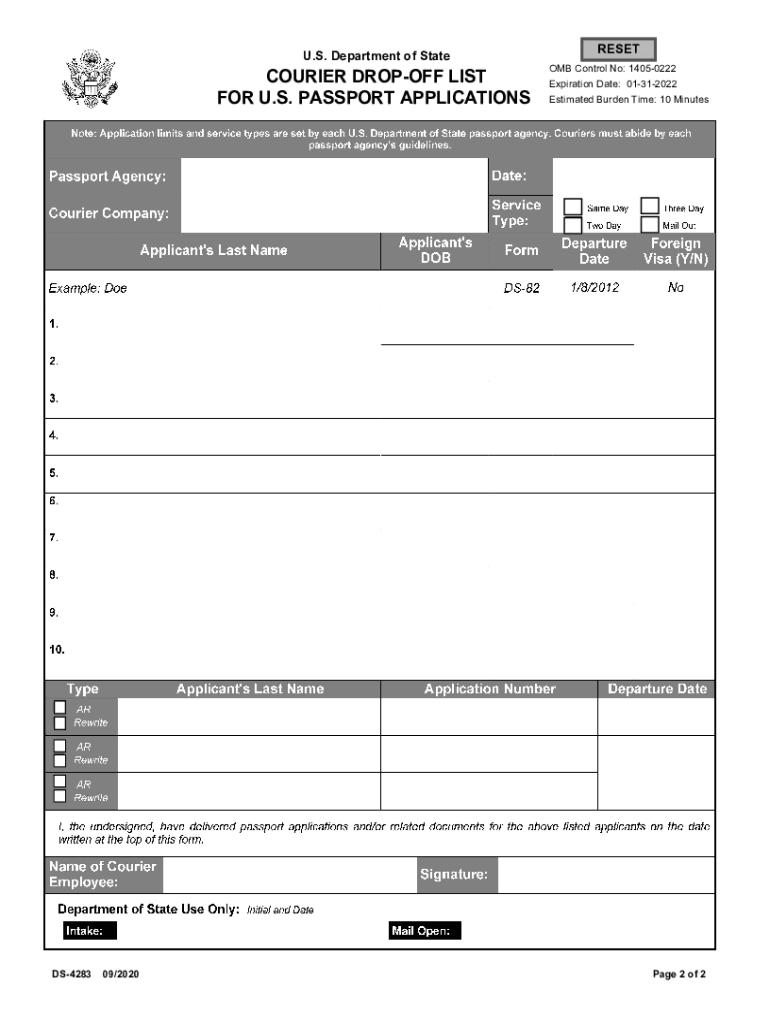
U.S. Department of StatCounter Drop-off List for U.S. Passport Applications INSTRUCTIONS 1. Please provide all required information on this form. Submit one drop-off list for each service type. 2.

Open form follow the instructions

Easily sign the form with your finger

Send filled & signed form or save
How to fill out the DoS DS-4283 online
Filling out the DoS DS-4283 online is an essential step for efficiently submitting U.S. passport applications through courier services. This guide provides clear and supportive instructions for users to complete the form accurately and effectively.
Follow the steps to fill out the DoS DS-4283.
- Click ‘Get Form’ button to obtain the form and open it in the editor.
- Begin by entering the passport agency where the applications will be submitted. Make sure to provide the correct agency name for proper processing.
- Next, input the current date in the designated field. This helps to track the timing of the submission.
- Fill in the courier company's name. This identifies the entity responsible for delivering the passport applications.
- Select the appropriate service type from the options provided (Same Day, Two Day, Three Day, Mail Out). This indicates the expected processing speed for the applications.
- List each applicant's last name and date of birth in the corresponding fields. Ensure accuracy to avoid delays in processing.
- For each applicant, provide the application number and departure date. These details are crucial for tracking the documents.
- Indicate whether a foreign visa is required by marking 'Yes' or 'No' in the designated field.
- In the designated area, check the appropriate box if you are submitting documentation in response to an agency request for more information or for corrections.
- The courier employee must sign and date the form to confirm delivery of the applications. This step is vital for accountability.
- Review the completed form for accuracy and completeness. Once satisfied, you can save your changes, download the form, print it, or share it as needed.
Ensure timely passport application submissions by completing the DoS DS-4283 online today.
Experience a faster way to fill out and sign forms on the web. Access the most extensive library of templates available.
Related content
Nov 17, 2020 — The Department of State (the Department) proposes regulations to continue...
... (DUCs) in all U.S. DPR regions totaled an estimated 4,283 wells in August 2022, the...
E.3.1 FTP Access via MS-DOS .......................... ... period (summertime) have...
Get answers to your most pressing questions about US Legal Forms API.
Do I send all 6 pages of a passport application?
Form DS-82 is fairly straightforward as a passport renewal application form: six pages long, four of which are instructions and two which must be mailed or handed in.
Can I print out a DS-82 form?
You can fill out the form using the online form filler of the Department of State website (https://pptform.state.gov/) or print it out and fill it out by hand using a black pen.
Can I print out a DS-11 form?
You can fill out the DS-11 form online or print out and fill out by hand. If you fill out the form electronically, at the end of the questionnaire you will need to print the form and bring it at the time of the interview.
Can you print a passport form?
Here's how it works Send passport application form via email, link, or fax. You can also download it, export it or print it out.
Do local post offices have passport forms?
0:40 1:53 Does The Post Office Have Passport Forms? - CountyOffice.org - YouTube YouTube Start of suggested clip End of suggested clip And those not eligible to use the ds-82. Form but wait there's more not only do Post Offices provideMoreAnd those not eligible to use the ds-82. Form but wait there's more not only do Post Offices provide forms. But many also offer passport photo services.
Use professional pre-built templates to fill in and sign documents online faster. Get access to thousands of forms.
If you believe that this page should be taken down, please follow our DMCA take down process here.