Loading
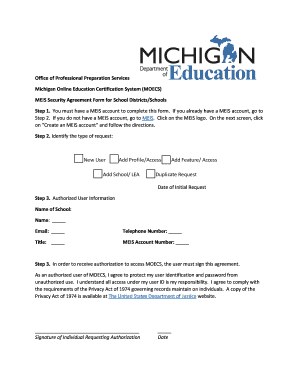
Get Mi Meis Security Agreement Form For Substitute Staffing Agencies
How it works
-

Open form follow the instructions
-

Easily sign the form with your finger
-

Send filled & signed form or save
How to fill out the MI MEIS Security Agreement Form For Substitute Staffing Agencies online
The MI MEIS Security Agreement Form is essential for substitute staffing agencies to gain authorized access to the Michigan Online Education Certification System (MOECS). This guide provides step-by-step instructions to assist users in completing the form accurately and efficiently.
Follow the steps to complete the MI MEIS Security Agreement Form.
- Click ‘Get Form’ button to obtain the form and open it in the editor.
- Identify the type of request you are making. Options include New User, Add Profile/Access, Add School/LEA, Add Feature/Access, or Duplicate Request. Be sure to indicate the Date of Initial Request.
- Fill in the Authorized User Information section. This requires entering the Name of the School, your Name, Email, Telephone Number, Title, and MEIS Account Number.
- To proceed, read the agreement statement and provide your confirmation by signing and dating the section that states your commitment to protecting your user identification and password.
- Complete the Superintendent or Chief Operating Officer Information section by providing their Name, Title, Email, and Telephone Number. This section also requires their signature and date to confirm authorization for access.
- Select the access type for the authorized user. Choose between VIEW ACCESS ONLY or ACTION ACCESS based on the required functionalities.
- Review all the entered information for accuracy before proceeding to the finalization stage.
- Once all sections are complete, you can save changes, download, print, or share the completed form. Finally, email the filled form to MOECSsupport@michigan.gov.
Complete your forms online for efficient processing and authorization.