Loading
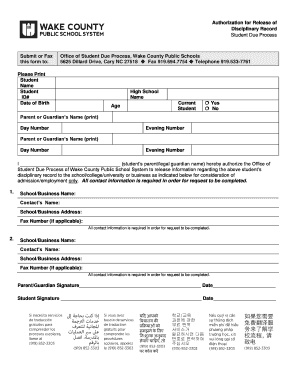
Get Nc Wcpss Authorization For Release Of Disciplinary Record
How it works
-

Open form follow the instructions
-

Easily sign the form with your finger
-

Send filled & signed form or save
How to fill out the NC WCPSS Authorization For Release Of Disciplinary Record online
This guide provides clear and supportive instructions for users on how to accurately complete the NC WCPSS Authorization For Release Of Disciplinary Record online. Follow these steps to ensure your submission is effective and comprehensive.
Follow the steps to successfully complete the form.
- Press the ‘Get Form’ button to obtain the NC WCPSS Authorization For Release Of Disciplinary Record form and open it in the editor.
- Enter the student’s full name in the 'Student Name' field. Ensure that the name is spelled correctly to avoid any processing delays.
- Input the student's ID number in the designated field. This number can typically be found on the student’s school documents.
- Fill in the date of birth for the student in the correct format, ensuring that the date is accurate.
- Provide the name of the high school the student currently attends.
- Indicate the student’s age. This is essential for identification purposes.
- Specify whether the student is a current student by selecting either ‘Yes’ or ‘No’.
- Enter the parent or guardian’s name in the appropriate field and fill in their daytime and evening contact numbers.
- Repeat step 8 for the second parent or guardian if applicable.
- In the section that begins with ‘I ________ (student’s parent/legal guardian name)’, print the full name of the parent or legal guardian authorizing the release.
- Provide details of the institution or business to which the disciplinary record will be sent by filling in all fields for two separate entries: school/business name, contact’s name, address, and fax number if applicable.
- Ensure both the parent/guardian and student sign and date the form in the signature fields provided.
- Once all information is accurately completed, save your changes. You can choose to download, print, or share the completed form as needed.
Complete your documents online now for a smoother process.