Loading
Get Irrigation Station New Cash Customer Information Form 2018-2026
How it works
-

Open form follow the instructions
-

Easily sign the form with your finger
-

Send filled & signed form or save
How to fill out the Irrigation Station New Cash Customer Information Form online
Filling out the Irrigation Station New Cash Customer Information Form online is a straightforward process that ensures your information is accurately captured. This guide will provide clear, step-by-step instructions to effectively complete the form to become a new cash customer.
Follow the steps to successfully complete the form online.
- Click the ‘Get Form’ button to access the form and open it in your preferred online editor.
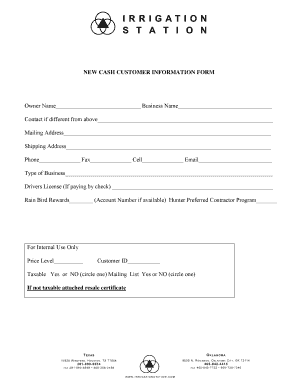
- In the 'Owner Name' field, enter the full name of the individual who owns the business. Ensure that this name is accurate as it represents the primary contact for the customer account.
- In the 'Business Name' section, input the official name of your business as it appears in legal documents.
- If the contact person differs from the owner, fill out the 'Contact if different from above' section with relevant details.
- Fill in the 'Mailing Address' with the location where you would like to receive correspondence. Include street address, city, state, and ZIP code.
- In the 'Shipping Address' field, provide the address where products should be delivered, if different from the mailing address.
- Enter your 'Phone', 'Fax', and 'Cell' numbers in their respective fields. Accuracy is important to ensure you receive timely communications.
- Input a valid 'Email' address, as this will be used for important communications and updates regarding your customer account.
- Select the 'Type of Business' from the available options, which may include categories such as retail, service provider, contractor, etc.
- If you choose to pay by check, include your 'Drivers License' number in the designated section for verification.
- If you are part of the Rain Bird Rewards program, provide your account number in the appropriate section. Also, indicate if you are a participant in the Hunter Preferred Contractor Program.
- For internal use, note the 'Price Level' and 'Customer ID' if applicable and provided by the service.
- Indicate whether the account will be taxable by circling 'Yes' or 'No'. If you select 'Yes', include a resale certificate if it is not a taxable transaction.
- Once you have filled in all necessary fields, review your information for accuracy before proceeding to save, download, print, or share your completed form.
Begin completing your Irrigation Station New Cash Customer Information Form online today for seamless client onboarding.