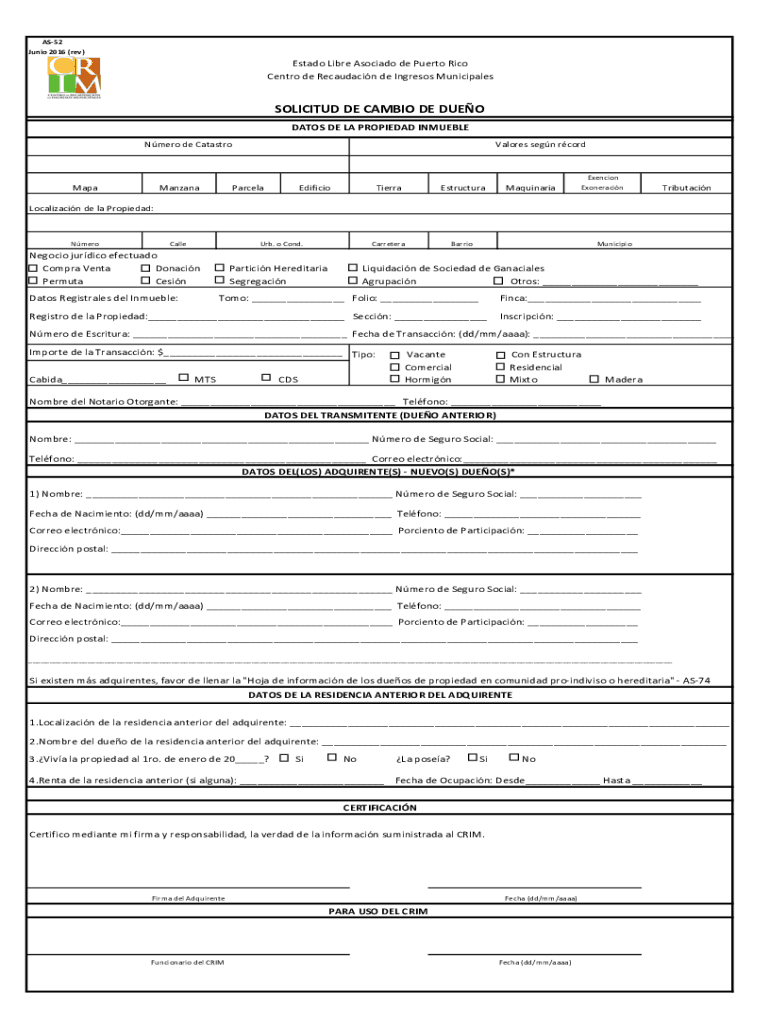
AS52 Junio 2016 (rev)Estado Libre Asociado de Puerto RicoCentro de Recaudacin de Ingresos MunicipalesSOLICITUD DE CAMBIO DE DUE DATOS DE LA PROPIEDAD INMUEBLE Nmero de CatastroMapaManzanaValores segn rcordParcelaEdificioTierraEstructuraCarreteraBarrioMaquinariaExencionExoneracinTributacinLocalizacin de la Provided:NmeroCalleUrb. o Cold.
Loading

Open form follow the instructions

Easily sign the form with your finger

Send filled & signed form or save
How to fill out the PR AS-52 online
The PR AS-52 form is an essential document for requesting a change of ownership in Puerto Rico. This guide will provide step-by-step instructions on how to accurately fill out the form online, ensuring a smooth and efficient process.
Follow the steps to complete the PR AS-52 form online.
- Press the 'Get Form' button to access the PR AS-52 form and open it in your browser.
- Begin by filling in the property details. Provide the Catastral number, map, block, and any relevant values as recorded, including parcel, building, land, structure, road, neighborhood, and machinery details.
- Indicate the exemption or tax information related to the property, along with the property location details such as number, street, urbanization, or condominium name.
- Select the type of transaction performed (purchase, sale, donation, etc.) and enter all required registration information, including municipal data and property registration details like volume, page, and deed number.
- Provide the details of the previous owner, including their name, social security number, phone number, and email address.
- Fill out the details of the new owner(s) with names, social security numbers, dates of birth, phone numbers, email addresses, percentage of ownership, and postal addresses. If there are multiple new owners, include their information as well.
- For each new owner, provide information about their previous residence, including the address and the name of the previous owner, as well as whether they lived in and owned the property as of January 1 of the relevant year.
- Complete the rent information for the previous residence, if applicable, including occupation dates.
- Sign and date the certification section to validate the truthfulness of the information provided.
- Finally, save your changes, download the completed form, print it, or share it as needed.
Complete your PR AS-52 form online today for a seamless change of ownership process.
Experience a faster way to fill out and sign forms on the web. Access the most extensive library of templates available.
Related content
May 9, 2013 — Evidence presented during the 12-day trial revealed that Los Zetas are a...
A judgment on partial findings must be supported by findings of fact and conclusions of...
Puerto Rico Highway 196 (PR-196) is an urban road in Caguas, Puerto Rico. ... PR-34 in...
Use professional pre-built templates to fill in and sign documents online faster. Get access to thousands of forms.
If you believe that this page should be taken down, please follow our DMCA take down process here.