Loading
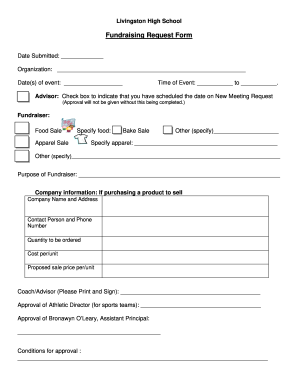
Get Nj Livingston High School Fundraising Request Form
How it works
-

Open form follow the instructions
-

Easily sign the form with your finger
-

Send filled & signed form or save
How to fill out the NJ Livingston High School Fundraising Request Form online
Filling out the NJ Livingston High School Fundraising Request Form online is an important step in organizing a successful fundraising event. This guide will provide you with clear and detailed instructions to ensure that you complete the form accurately and efficiently.
Follow the steps to fill out the fundraising request form seamlessly.
- Press the ‘Get Form’ button to access the fundraising request form and open it in your preferred editor.
- Begin by entering the 'Date Submitted' in the designated field at the top of the form. This ensures accurate tracking of your submission.
- Complete the 'Organization' field with the name of your group or club responsible for the fundraising event.
- Fill in the 'Date(s) of event' to specify when your fundraiser will take place, ensuring that it matches with your scheduled dates.
- Enter the 'Time of Event' by specifying the start and end times clearly to avoid any confusion about the schedule.
- Check the box next to 'Advisor' to confirm that you have scheduled the date on the New Meeting Request, as this approval is necessary for processing.
- Select the type of fundraiser you are organizing by marking the appropriate box for food sale, apparel sale, bake sale, or other. Provide further specifications where prompted.
- For 'Company information,' if applicable, fill out the details of the product provider, including 'Company Name and Address,' 'Contact Person and Phone Number,' 'Quantity to be ordered,' 'Cost per unit,' and 'Proposed sale price per unit.'
- Print your name and signature in the 'Coach/Advisor' section to indicate approval, and ensure that all necessary signatures are obtained, including that of the Athletic Director and the Assistant Principal.
- Review the 'Conditions for approval' section carefully and ensure you address any requirements mentioned there.
- Once you have completed all fields, save your changes, and consider downloading or printing the form as needed for your records.
- Finally, submit the form as per the school's submission guidelines and await confirmation of your fundraising event.
Complete your documents online today and ensure your fundraising event is set up for success.