Loading
Get Il Boilermakers Y102-m58 2019-2026
How it works
-

Open form follow the instructions
-

Easily sign the form with your finger
-

Send filled & signed form or save
How to fill out the IL Boilermakers Y102-M58 online
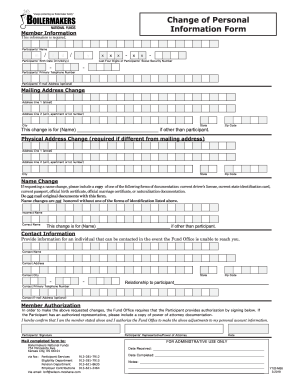
This guide provides clear and detailed instructions on how to complete the IL Boilermakers Y102-M58 online form. It aims to assist users in accurately updating their personal information with the National Funds.
Follow the steps to efficiently fill out your form.
- Use the ‘Get Form’ button to access the IL Boilermakers Y102-M58 and open it in a suitable editor.
- In the 'Member Information' section, fill in the participant's full name, birth date in the format mm/dd/yyyy, primary telephone number, and the last four digits of their Social Security number. Optionally, include their email address.
- For a mailing address change, enter the new address details in 'Address Line 1' and 'Address Line 2' fields, and provide the city, state, and zip code. If applicable, specify the name of the individual this change concerns.
- If the physical address differs from the mailing address, complete the required fields for the physical address with the same information as in step 3.
- If requesting a name change, indicate the incorrect name and the correct name. Attach a copy of one of the acceptable forms of documentation listed on the form, ensuring not to send original documents.
- In the 'Contact Information' section, provide the name, address, city, state, zip code, primary telephone number, and optionally an email address of a contact person that the Fund Office can reach if they are unable to contact the participant.
- Confirm authorization by signing in the 'Member Authorization' section. If a power of attorney is involved, include a copy of the documentation.
- Once all sections are completed, save any changes. You can then download, print, or share the form as needed.
Start completing your IL Boilermakers Y102-M58 online today!