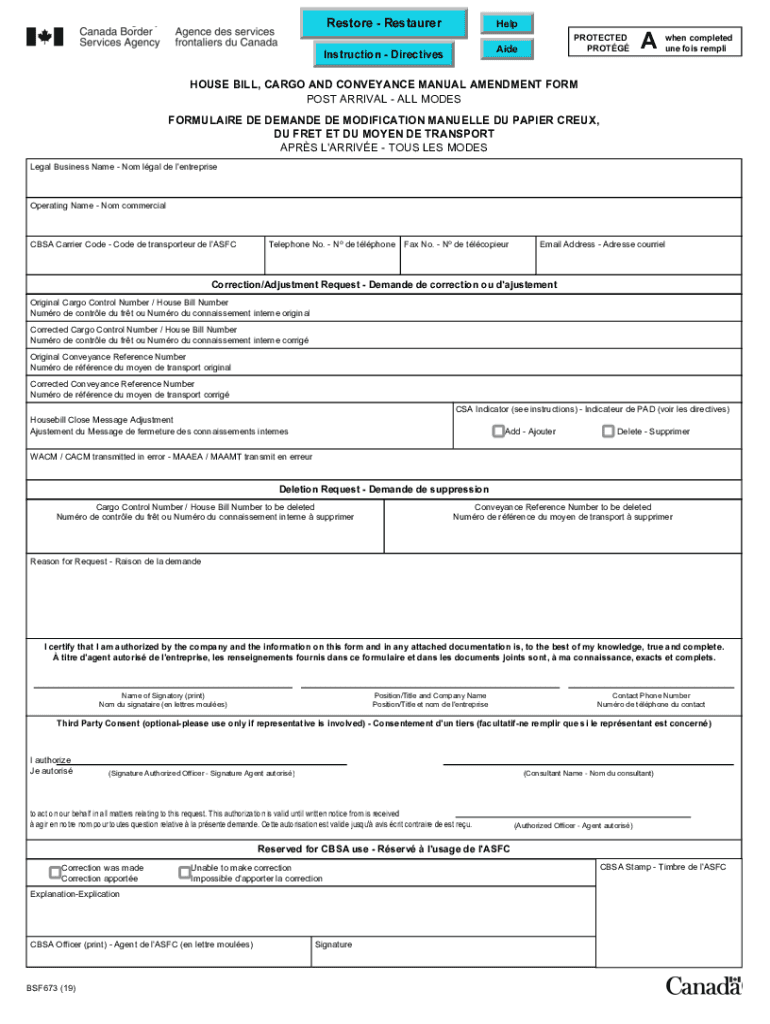
Restore Restorer Help Instruction Directives Aide PROTECTED PLOT G A when complete dune foil temple HOUSE BILL, CARGO AND CONVEYANCE MANUAL AMENDMENT FORM POST ARRIVAL ALL MODES FORMULA.
Loading

Open form follow the instructions

Easily sign the form with your finger

Send filled & signed form or save
How to fill out the Canada BSF673 online
This guide provides comprehensive instructions on how to complete the Canada BSF673 form online. Users will find a step-by-step overview to ensure accurate submissions for corrections or adjustments regarding cargo and conveyance.
Follow the steps to successfully complete the Canada BSF673 form online.
- Press the ‘Get Form’ button to obtain the form and open it in your preferred online editor.
- Begin by entering the legal business name in the designated field. This is the official name of the company making the request.
- Fill out the operating name, which is the name under which the business operates, if different from the legal business name.
- Input the CBSA carrier code, which identifies the carrier involved in the transport.
- Provide the contact telephone number for the company, ensuring accuracy for any follow-up communications.
- Enter the fax number if applicable. Include an email address where correspondence can be sent.
- In the correction/adjustment request section, specify the original cargo control number or house bill number that requires correction.
- Complete the corrected cargo control number or house bill number field to indicate the accurate information that should replace the original.
- If applicable, provide the original and corrected conveyance reference numbers.
- Indicate whether the CSA indicator requires adjustment, as per the instructions provided.
- If making a deletion request, fill in the relevant cargo control number or house bill number, along with the conveyance reference number to be deleted.
- Provide the reason for your request in the designated field, ensuring clarity and completeness.
- Certify that the information provided is true and complete by printing the name of the signatory and their position/title, as well as the company name.
- Include the contact phone number for the individual listed, ensuring that the form is completed adequately.
- If a third party is involved, fill in the relevant consent section allowing them to act on your behalf.
- Review all entries for accuracy before saving the changes to your form, which can then be downloaded, printed, or shared as needed.
Complete your Canada BSF673 form online today to ensure a smooth correction or adjustment process.
Experience a faster way to fill out and sign forms on the web. Access the most extensive library of templates available.
Related content
by C by Non-residents — This memorandum outlines the Canada Border Services Agency's...
Get answers to your most pressing questions about US Legal Forms API.
Where do I send my BSF673 form?
For the Air and Marine modes: To correct an air or marine CRN, the client must first update each related cargo document to reflect the correct CRN and then submit CBSA Form BSF673 to the Canada Border Services Agency (CBSA).
What are CBSA responsibilities?
The agency is responsible for providing integrated border services that support national security and public safety priorities and facilitate the free flow of persons and goods, including animals and plants, that meet all requirements under the program legislation.
How many CBSA are there in the US?
The United States Office of Management and Budget (OMB) has defined 927 core-based statistical areas (CBSAs) for the United States and 12 for Puerto Rico.
Where do CBSA work?
They work at 1,100 points of service across the country, including land borders, international airports, marine terminals, rail ports, and postal facilities, to enforce laws and regulations that touch nearly every sector of Canadian society.
What is the full form of CBSA?
The Canada Border Services Agency ( CBSA ) facilitates the flow of legitimate travellers and trade.
Is CBSA an immigration?
The Canada Border Services Agency (CBSA) (French: Agence des services frontaliers du Canada - ASFC) is a federal law enforcement agency that is responsible for border enforcement, immigration enforcement and customs services.
Use professional pre-built templates to fill in and sign documents online faster. Get access to thousands of forms.
If you believe that this page should be taken down, please follow our DMCA take down process here.