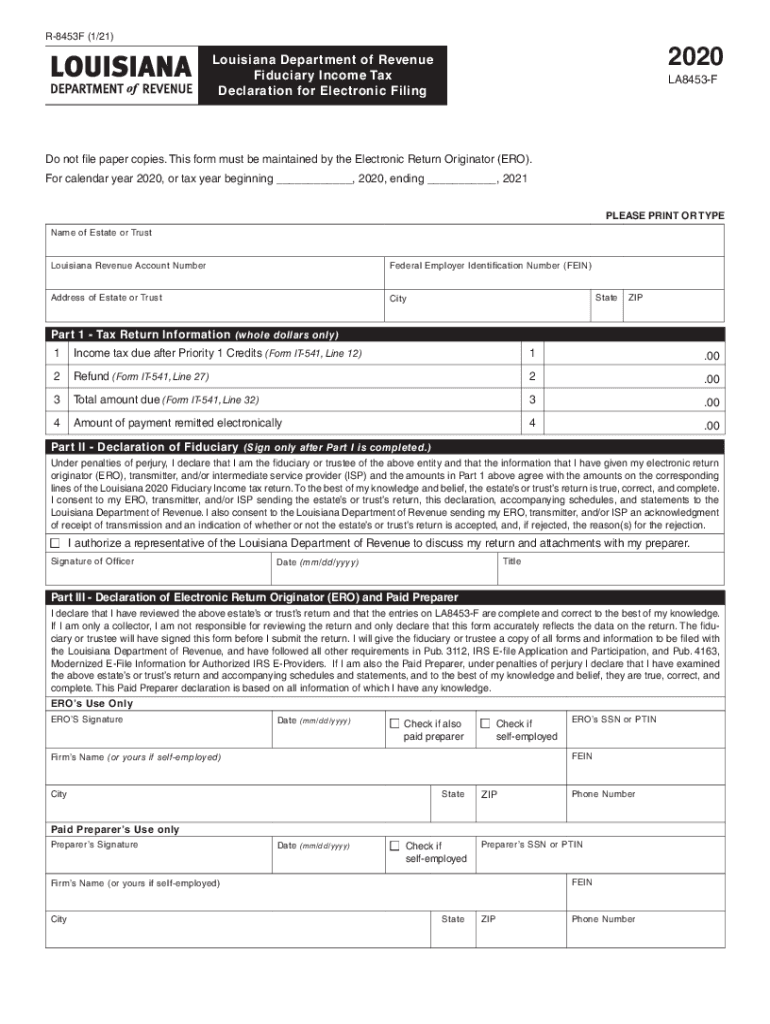
R8453F (1/21)2020Louisiana Department of Revenue Fiduciary Income Tax Declaration for Electronic FilingLA8453FDo not file paper copies. This form must be maintained by the Electronic Return Originator.
Loading

Open form follow the instructions

Easily sign the form with your finger

Send filled & signed form or save
How to fill out the LA DoR R-8453F online
This guide provides a comprehensive walkthrough on filling out the LA DoR R-8453F form online. Whether you are new to tax forms or have some experience, this step-by-step approach will ensure you complete the form accurately and efficiently.
Follow the steps to complete the LA DoR R-8453F online.
- Click ‘Get Form’ button to obtain the form and open it in the editor.
- Begin by entering the name of the estate or trust in the designated field. Ensure that the spelling is correct.
- Input the Louisiana Revenue Account Number associated with the estate or trust. Double-check for accuracy.
- Enter the Federal Employer Identification Number (FEIN) necessary for tax identification. It should be a nine-digit number.
- Fill in the address of the estate or trust, including the city, state, and ZIP code. Ensure all information is correct and formatted properly.
- In Part 1, provide the income tax due after Priority 1 Credits as indicated on Form IT-541, Line 12. Make sure to use whole dollars only.
- Next, enter the refund amount from Form IT-541, Line 27 in the designated field, also using whole dollars.
- Provide the total amount due as indicated on Form IT-541, Line 32. Confirm the accuracy of the amount.
- Input the amount of payment that is remitted electronically in the appropriate field.
- Once Part 1 is completed, proceed to Part II. The fiduciary or trustee must sign the declaration, confirming the accuracy of the information provided.
- The officer must include their title and date in the respective fields, formatted as mm/dd/yyyy.
- In Part III, if applicable, the Electronic Return Originator (ERO) must review and sign, confirming the accuracy of details reflected in the LA DoR R-8453F. They also need to include their SSN or PTIN and firm’s name if applicable.
- If a paid preparer is involved, they also need to sign and provide their information, including SSN or PTIN, confirming the return's accuracy.
- Finally, review all completed sections for accuracy. Save changes, download, print, or share the completed form as needed.
Complete your tax documents online today for a smoother filing experience.
Experience a faster way to fill out and sign forms on the web. Access the most extensive library of templates available.
Related content
Louisiana Individual Income Tax Declaration from Electronic Filing. 01/01/2021...
Form 8453-F, U.S. Estate or Trust ... If the estate or trust is the beneficiary Form...
4.6 Application for Automatic Extension of Time to File Certain Business Income Tax...
Get answers to your most pressing questions about US Legal Forms API.
Do I owe Louisiana state taxes?
To verify your tax liability for individual income tax, call LDR at (225) 219-0102. To verify your tax liability for business taxes, you can review your liabilities online using the Louisiana Taxpayer Access Point (LaTAP) system.
Who must file a Louisiana tax return?
Who must file. Louisiana residents, part-year residents of Louisiana, and nonresidents with income from Louisiana sources who are required to file a federal income tax return must file a Louisiana Individual Income Tax Return.
Do I have to pay Louisiana state taxes?
Resident Individual Income Tax Resident taxpayers who are required to file a federal individual income tax return are required to file a Louisiana income tax return, IT-540, reporting all of their income. If a Louisiana resident earns income in another state, that income is also taxable by Louisiana.
How do I check my state income tax in Louisiana?
To check the status of your Louisiana state refund online, go to https://latap.revenue.louisiana.gov/?Link=WMR. Click “Next” for refund status.
Can I pay Louisiana state taxes online?
Welcome to Online Filing and Payments You have arrived at Louisiana File and Pay Online, your gateway to filing and paying your state taxes electronically. Louisiana File Online is a fast, easy to use, absolutely free public service from the Louisiana Department of Revenue.
How much Louisiana state tax do I owe?
Louisiana has a 4.45 percent state sales tax rate, a max local sales tax rate of 7.00 percent, and an average combined state and local sales tax rate of 9.55 percent. Louisiana's tax system ranks 39th overall on our 2023 State Business Tax Climate Index.
Why would I get a letter from Louisiana Department of Revenue?
If your tax return is under audit, you will receive written correspondence in the mail from an LDR tax auditor with detailed information concerning your audit. An auditor may call you first to verify contact information. I have received a letter stating my tax return is under audit.
Is an individual required to file a tax return if he or she owes no tax?
The IRS has general filing requirements for most taxpayers. Even if no tax is owed, most people file a return if their gross income is more than the automatic deductions for the year. The primary automatic deduction is the the standard deduction. Its amount will depend on your filing status and age.
Use professional pre-built templates to fill in and sign documents online faster. Get access to thousands of forms.
If you believe that this page should be taken down, please follow our DMCA take down process here.
This form is available in several versions. Select the version you need from the drop-down list below.