Loading
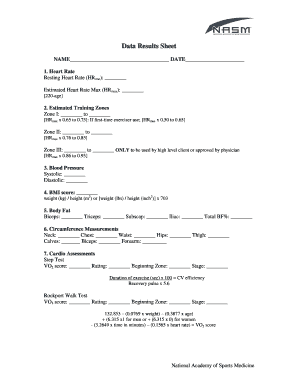
Get Nasm Data Results Sheet 2015-2026
How it works
-

Open form follow the instructions
-

Easily sign the form with your finger
-

Send filled & signed form or save
How to fill out the NASM Data Results Sheet online
The NASM Data Results Sheet is an essential tool for tracking fitness assessments and health metrics. This guide provides a clear, step-by-step approach to filling out the sheet online, ensuring accuracy and completeness for effective health monitoring.
Follow the steps to accurately complete the NASM Data Results Sheet online.
- Press the ‘Get Form’ button to access the NASM Data Results Sheet and open it for editing.
- In the 'Name' field, write your full name. Below that, in the 'Date' section, enter the current date of the assessment.
- For the heart rate section, input your resting heart rate in 'Resting Heart Rate (HRrest)' and calculate your estimated maximum heart rate using the formula [220 - age]. Fill in this calculation under 'Estimated Heart Rate Max (HRmax)'.
- Next, move to the 'Estimated Training Zones' section. Calculate and input the heart rate ranges for each zone based on your HRmax: Zone I (HRmax x 0.65 to 0.75), Zone II (HRmax x 0.76 to 0.85), and Zone III (HRmax x 0.86 to 0.95, only applicable for high-level clients or those with physician approval).
- In the 'Blood Pressure' section, record your systolic and diastolic blood pressure measurements.
- Calculate your BMI score by using the formula weight (kg) / height (m²) or by using the alternate method: [weight (lbs) / height (in²)] x 703. Input the result in the designated field.
- For the 'Body Fat' measurements, record the values for Biceps, Triceps, Subscapular, Iliac, and the total body fat percentage.
- In the 'Circumference Measurements' section, provide measurements for Neck, Chest, Waist, Hips, Thigh, Calves, Biceps, and Forearm.
- Proceed to the 'Cardio Assessments' section. For the Step Test, record the VO2 score, rating, beginning zone, and stage, including the duration of exercise in seconds multiplied by 100 for CV efficiency and recovery pulse multiplied by 5.6.
- For the Rockport Walk Test, calculate the VO2 score using the provided formula, inputting your weight, age, time in minutes, and heart rate.
- Complete the 'Movement Assessments' section by filling in all relevant observations for the Overhead Squat, Single-leg Squat, and other kinetic chain checkpoints listed.
- Finally, review all filled sections for accuracy, and then save changes, download, or print the completed form as needed.
Complete your NASM Data Results Sheet online to track your fitness progress effectively.
The simplest way to determine that is to subtract your age from 220. That number is a general guideline for your max heart rate. Then multiply that number times the percentage listed in the exercise heart rate zone you want to be in.
Industry-leading security and compliance
US Legal Forms protects your data by complying with industry-specific security standards.
-
In businnes since 199725+ years providing professional legal documents.
-
Accredited businessGuarantees that a business meets BBB accreditation standards in the US and Canada.
-
Secured by BraintreeValidated Level 1 PCI DSS compliant payment gateway that accepts most major credit and debit card brands from across the globe.