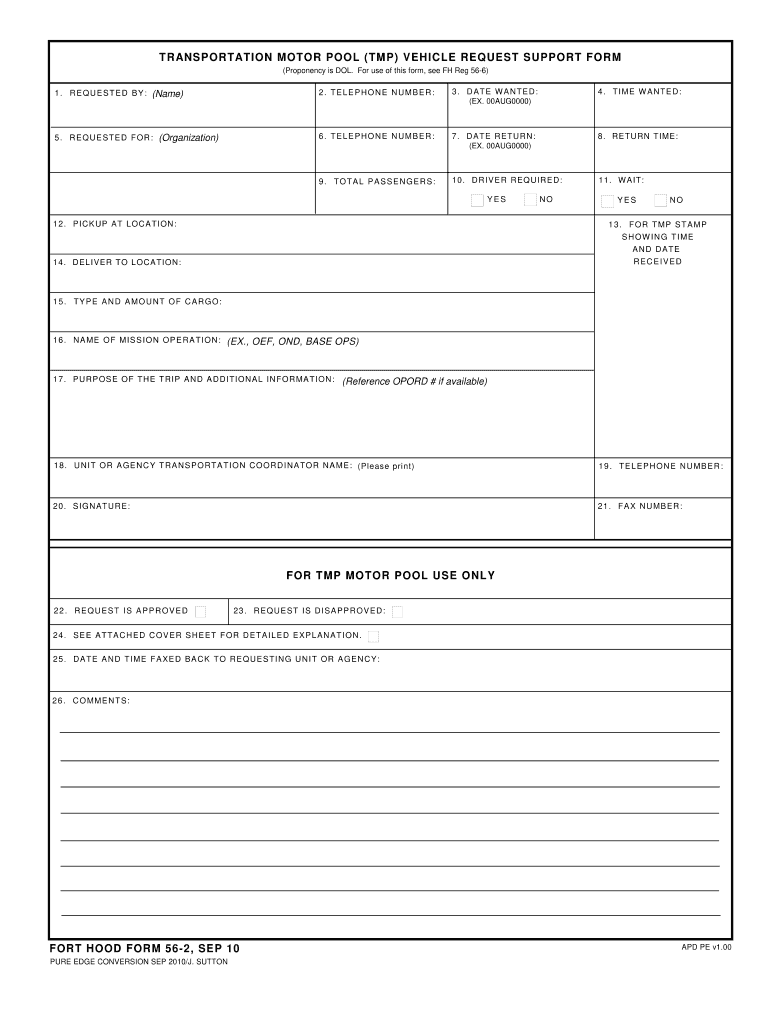
DATE AND TIME FAXED BACK TO REQUESTING UNIT OR AGENCY 26. COMMENTS FORT HOOD FORM 56-2 SEP 10 PURE EDGE CONVERSION SEP 2010/J. SUTTON APD PE v1. T RANS POR TAT ION MOTOR POOL TMP V EHIC LE REQUES T S UPPORT FOR M Proponency is DOL. For use of this form see FH Reg 56-6 1. R E Q U E S T E D B Y Name 2. TELEPHONE NUMBER 5. R E Q U E S T E D F O R Organization 3. DATE W ANTED 4. .
Loading

Open form follow the instructions

Easily sign the form with your finger

Send filled & signed form or save
How to fill out the Fort Hood 56-2 online
Completing the Fort Hood 56-2 form online is an essential process for requesting transportation support. This guide will provide you with clear, step-by-step instructions to fill out the form accurately and efficiently.
Follow the steps to successfully fill out the Fort Hood 56-2 form online.
- Click ‘Get Form’ button to obtain the form and open it in the editor.
- In the 'Requested by' section, enter your full name in the designated field to identify yourself as the requester.
- Provide your telephone number in the next field to ensure that you can be contacted regarding your request.
- Indicate the organization for which the request is being made in the 'Requested for' field.
- Fill in the telephone number for the requesting organization to facilitate communication.
- Specify the date wanted for the transportation service in the 'Date wanted' field.
- Input the time you need the service in the 'Time wanted' field, using the specified format (e.g., 00AUG0000).
- Enter the return date you wish to schedule in the 'Date return' field.
- Specify the return time in the 'Return time' field, also following the designated format.
- Indicate the number of total passengers that will be using the vehicle in the 'Total passengers' field.
- Select 'Yes' or 'No' regarding whether a driver is required for the transportation.
- Provide information on whether waiting is necessary by selecting 'Yes' or 'No' in the wait field.
- Leave space clear for the TMP stamp that will show the time and date received.
- Specify the delivery location where the vehicle should be brought to in the 'Deliver to location' field.
- Describe the type and amount of cargo that will be transported in the 'Type and amount of cargo' field.
- Enter the name of the mission operation (such as OEF, OND, BASE OPS) in the designated section.
- Explain the purpose of the trip and include any additional information such as the OPORD number, if available.
- Fill in the name of the unit or agency transportation coordinator, ensuring to print the information clearly.
- Provide a contact telephone number for the transportation coordinator.
- Affix your signature in the signature field to verify the request.
- Enter your fax number in case further communication is required.
- Once the form is filled out, review all sections to ensure accuracy before submitting.
- You may save changes, download, print, or share the form as necessary once completed.
Complete your Fort Hood 56-2 request form online to ensure timely transportation support.
Experience a faster way to fill out and sign forms on the web. Access the most extensive library of templates available.
Related content
Trainee Processing Center, Ft. Hood, ca. 1956-57, 8 in. Army School Center, Ft. Benjamin...
Fort Hood: “Greetings from Camp Hood, Texas” ... Fort Hood: Greetings from Camp Hood...
▻ A 3 core cable must be used as your tool is earthed and of Class 1 construction. ▻...
Get answers to your most pressing questions about US Legal Forms API.
What is the phone number for the Fort Hood operator?
You can reach the Fort Hood operator at (254) 287-1110. This number connects you to various services and resources available on the base. If you need further assistance navigating Fort Hood 56-2 provides a detailed guide on how to contact different departments onsite.
What units are under 3 corps?
Numerous units fall under the operational command of the 3 Corps at Fort Hood, including armored divisions, infantry, and support battalions. These units work together to ensure mission readiness and operational effectiveness. For a comprehensive look at these units, Fort Hood 56-2 serves as an excellent resource.
What is Fort Hood known for?
Fort Hood is known as one of the largest military installations in the world, playing a crucial role in the training and readiness of U.S. Army units. The base also hosts numerous community events and outreach programs. Discovering the highlights of Fort Hood through Fort Hood 56-2 can deepen your appreciation of its contributions to national defense and community engagement.
What MOS is stationed at Fort Hood?
A wide range of Military Occupational Specialties (MOS) are stationed at Fort Hood, reflecting the diverse units and missions operational there. Soldiers from various fields, including infantry, logistics, and intelligence, make their home at this installation. Learning about Fort Hood 56-2 can help you understand the significance of these roles in achieving operational success.
Who is the 3 Corps CSM?
The 3 Corps Command Sergeant Major (CSM) is the senior enlisted leader for the Corps and plays a critical role in enhancing readiness and morale among troops. This position is essential for maintaining standards and ensuring effective communication throughout Fort Hood. For more about the leadership roles at Fort Hood, refer to Fort Hood 56-2.
What command is Fort Hood?
Fort Hood operates under the United States Army Forces Command. It serves as a major training and mobilization center for Army units. By utilizing resources like Fort Hood 56-2, you can gain a clearer picture of how commands function within this strategic installation.
Can non-military live on Fort Hood?
Non-military personnel can live on Fort Hood through specific programs, especially if they are associated with military families or specific employment on the base. Typically, housing opportunities are primarily available to active military members. However, understanding Fort Hood 56-2 will reveal more about how community integration works at this military base.
Where is the 13th ESC?
The 13th Expeditionary Sustainment Command (ESC) is located on Fort Hood, Texas. This command plays a vital role in logistics and support operations in a variety of missions. If you're looking to understand more about the importance of the 13th ESC, exploring Fort Hood 56-2 can provide valuable insights into their contributions.
Where was the 3rd Armored Division located?
Initially, the 3rd Armored Division was stationed in Germany during the Cold War, reflecting its strategic importance in NATO. However, elements of this division also trained at Fort Hood 56-2, further establishing its significance in U.S. military history. The base remains a site of joint operations and historical recognition.
Where was the 2nd Armored Division stationed?
The 2nd Armored Division was primarily stationed in various locations across Europe during its active years. However, it also had ties to Fort Hood 56-2 through unit deployments and training exercises. This historical connection underscores the legacy of armored warfare at the base.
Use professional pre-built templates to fill in and sign documents online faster. Get access to thousands of forms.
If you believe that this page should be taken down, please follow our DMCA take down process here.