Loading
Get Au Commsec Csl1029 2017-2026
How it works
-

Open form follow the instructions
-

Easily sign the form with your finger
-

Send filled & signed form or save
How to fill out the AU CommSec CSL1029 online
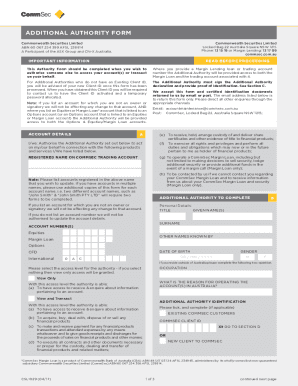
This guide provides a clear and supportive overview for users needing assistance in filling out the AU CommSec CSL1029 form online. It outlines step-by-step instructions to help you authorize another individual to access your accounts effectively.
Follow the steps to successfully complete the form.
- To obtain the form, click the 'Get Form' button and open it in your preferred editor.
- Begin by reading the important information provided at the top of the form. This will detail the purpose of the form and any requirements for identification.
- In the account details section, list any accounts you wish to update. If you are not the owner or signatory of an account, remember that you cannot make changes to that account.
- Next, fill out the personal details of the additional authority. This includes their title, given name(s), surname, and date of birth. Ensure that all information is accurate to avoid delays.
- Select the access level for the additional authority. You can choose 'View Only' or 'View and Transact' based on the level of control you wish to grant.
- If the additional authority is new and does not have a CommSec client ID, they will need to provide proof of identification. Follow the instructions in Section C regarding acceptable documents.
- Next, complete the mandatory identification requirements, ensuring that certified copies of identification documents are attached.
- Have all account holders sign the form in the designated areas. Remember that the authority must sign and acknowledge their responsibilities as outlined in the form.
- Finally, you have the option to save changes, download the form, print it out, or share it as needed.
Complete your AU CommSec CSL1029 form online today to ensure timely access for your additional authority.
CommSec is Australia's No.1 online broker and has been helping investors reach their goals for more than 20 years. Sign up for access to the tools and support you need to trade with confidence.