Loading
Get Irs 1028 2006-2026
How it works
-

Open form follow the instructions
-

Easily sign the form with your finger
-

Send filled & signed form or save
How to fill out the IRS 1028 online
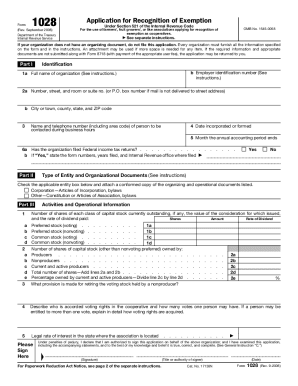
Filling out the IRS 1028 form, which is the application for recognition of exemption under section 521 of the Internal Revenue Code, is an essential task for agricultural associations seeking tax-exempt status. This guide offers clear, step-by-step guidance to help you complete the form accurately and efficiently online.
Follow the steps to successfully complete the IRS 1028 form online.
- Press the ‘Get Form’ button to acquire the IRS 1028 form and open it in your online editor.
- In Part I, fill in the identification section. Start with the full name of your organization, followed by your employer identification number, address details, and contact information for the person available during business hours.
- Continue to Part II to indicate your entity type. Check the box that matches your organization’s status and attach the corresponding organizing document.
- In Part III, provide detailed information about your activities and operational structure. You will need to outline the shares of capital stock, describe voting rights, and specify the organization's interaction with members and nonmembers.
- Part IV requires financial data. Complete the Statement of Receipts and Expenditures, including total receipts and total expenditures for the current and previous years. Ensure all necessary schedules are attached.
- Review your completed form thoroughly for any missing information or errors. Corrections can be made as needed.
- Once you have finalized the form, you can save the changes, download a copy for your records, or print it out for mailing to the relevant address as indicated in the updated mailing information.
Complete your IRS 1028 form online to ensure timely submission and compliance.
The W-8BEN is an Internal Revenue Service (IRS) mandated form to collect correct Nonresident Alien (NRA) taxpayer information for individuals for reporting purposes and to document their status for tax reporting purposes.