Loading
Get Wi St. Dennis Catholic School Athletic Medical Forms 2018-2026
How it works
-

Open form follow the instructions
-

Easily sign the form with your finger
-

Send filled & signed form or save
How to fill out the WI St. Dennis Catholic School Athletic Medical Forms online
Filling out the WI St. Dennis Catholic School Athletic Medical Forms online can be a straightforward process when you understand each section of the form. This guide walks you through the essential steps to ensure you provide all the necessary information required for your child's participation in athletics.
Follow the steps to complete the form successfully.
- Press the ‘Get Form’ button to access the form and open it in your chosen editing platform.
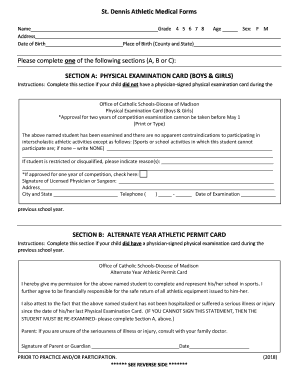
- Begin by entering your child's name, address, date of birth, grade, age, and gender. Provide the place of birth, including the county and state.
- Select one of the sections to complete: Section A, B, or C, based on your child's medical examination status.
- For Section A, if your child does not have a signed physical examination card, complete this section. Include all required details, such as any restrictions on participation in sports or activities, and ensure the licensed physician or surgeon signs the section.
- For Section B, if your child has a signed physical examination card from the previous year, complete this section. Confirm that your child has not experienced significant illnesses or injuries and sign where prompted.
- For Section C, if your child cannot complete a physical examination before the sports season starts, indicate this in Section C. Provide the estimated date for when the completed form will be submitted and sign to take responsibility.
- Review the entire form for accuracy, then save your changes. You may print, download, or share the completed form as necessary.
Complete the WI St. Dennis Catholic School Athletic Medical Forms online today to ensure your child is ready for participation.