Loading
Get Ny Yorktown Heights Engine Company 1 Application For Membership 2002-2025
How it works
-

Open form follow the instructions
-

Easily sign the form with your finger
-

Send filled & signed form or save
How to fill out the NY Yorktown Heights Engine Company 1 Application For Membership online
Filling out the NY Yorktown Heights Engine Company 1 Application for Membership online can seem daunting, but this guide will help you navigate each section with clarity. By following these steps, you will ensure that your application is completed accurately and comprehensively.
Follow the steps to complete your application effectively.
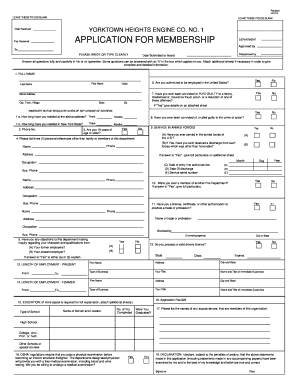
- Click ‘Get Form’ button to obtain the form and open it in the editor.
- Begin with your full name by entering your first and last name in the designated fields. Ensure accuracy as this will be your official identification on the application.
- Fill in your current address including street, city, town, village, and zip code. If you have lived at this address for less than two years, indicate how long you have resided there.
- Provide your phone number and ensure it is a number where you can be reached easily.
- Answer whether you are 18 years of age or older by selecting 'Yes' or 'No'.
- List three personal references who are not your family members or members of the fire department. Include their name, address, and phone number.
- Indicate if you are authorized to be employed in the United States by selecting 'Yes' or 'No'.
- You will need to disclose any felony or misdemeanor convictions. If applicable, provide details on an additional sheet.
- If you have served in the armed forces, provide details regarding your service, including dates and discharge status. If you have previously been a member of another fire department, note this as well.
- Complete the educational background section by listing the schools you attended and if you graduated. Specify any licenses or certifications you hold related to a trade or profession.
- The application also asks if you are willing to undergo a medical examination required for interior structural firefighting. Select 'Yes' or 'No' accordingly.
- Finally, review all the information filled in the application, sign and date the declaration section to confirm the accuracy of the provided information.
- Once completed, you can save changes, download or print a copy of your application, or share it as necessary.
Take the first step towards your membership by completing the application online today!
Industry-leading security and compliance
US Legal Forms protects your data by complying with industry-specific security standards.
-
In businnes since 199725+ years providing professional legal documents.
-
Accredited businessGuarantees that a business meets BBB accreditation standards in the US and Canada.
-
Secured by BraintreeValidated Level 1 PCI DSS compliant payment gateway that accepts most major credit and debit card brands from across the globe.