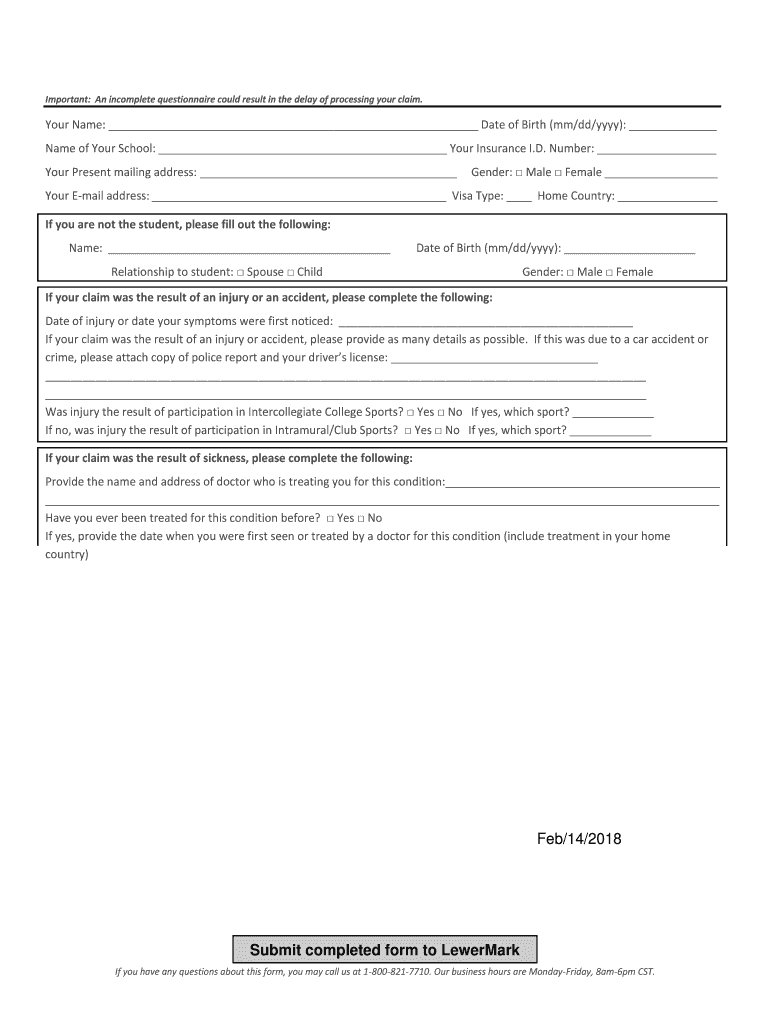
CLAIMS QUESTIONNAIRE Administered by: The Lewer Agency, Inc.Please submit completed form to: lewermarksupport lewer.com The Lewer Agency PO Box 32247 Kansas City, MO 64171Important: An incomplete.
Loading

Open form follow the instructions

Easily sign the form with your finger

Send filled & signed form or save
How to fill out the KS LewerMark Student Insurance Claims Questionnaire online
This guide provides step-by-step instructions on how to complete the KS LewerMark Student Insurance Claims Questionnaire online. It is designed to assist users in submitting their insurance claims accurately and efficiently.
Follow the steps to successfully complete the questionnaire:
- Press the ‘Get Form’ button to access the questionnaire and open it in your preferred editing tool.
- Begin by filling in your personal details, including your name, date of birth, school name, insurance ID number, and mailing address.
- Indicate your gender and provide your email address and other relevant details such as visa type and home country.
- If you are completing the form on behalf of a student, fill in the student’s name, date of birth, and your relationship to the student.
- For claims resulting from an injury or accident, indicate the date the injury occurred and provide as many details as possible about the incident.
- If applicable, state whether the injury was due to intercollegiate or intramural sports and specify the sport.
- For claims related to sickness, provide the name and address of the treating physician and any prior treatment history for the condition.
- List all current medications you are taking and indicate if you have any other insurance coverage.
- Review the authorization section carefully and provide your electronic signature by typing your name and insurance ID number in the given spaces.
- Finalize your submission by saving the changes. You can download, print, or share the completed form as necessary.
Complete your online claim submission today to ensure timely processing of your insurance issues.
Experience a faster way to fill out and sign forms on the web. Access the most extensive library of templates available.
Related content
391, BLINK HEALTH ADMINISTRATION, LLC, Test Strip Mom, 90 Wildwood Dr ... 1010, CAREINGTON...
Overland Park, KS 66210 ... Important Information About Your LewerMark Student Insurance...
Get answers to your most pressing questions about US Legal Forms API.
What is the explanation of benefits for LewerMark?
An Explanation of Benefits, or EOB, is a form you will receive online if you visit a provider. It shows the charges, discounts, and any amount that is still owed. You will also receive an email that your EOB is available online to review. An EOB is not a bill.
Does LewerMark cover birth control?
Don't forget to bring your ID card when you visit the doctor or the pharmacy! Oral birth control covered at 100% at a retail participating network pharmacy.
Why is my insurance charging me for birth control?
Insurers do have a little flexibility. Plans aren't required to cover all brands of birth control, so for example it's legal to cover some types of the pill but not others. The law says plans have to cover all 18 FDA-approved birth control methods for women, even if there's no generic version.
How do I know if birth control is covered by my insurance?
Call your health plan. This phone number is on your insurance card. If your plan is through your job, you may be able to speak with someone in the Human Resources department.
How do I contact LewerMark?
If you need further assistance, please contact LewerMark Customer Service at 800-821-7710 or send us an email.
Use professional pre-built templates to fill in and sign documents online faster. Get access to thousands of forms.
If you believe that this page should be taken down, please follow our DMCA take down process here.