Loading
Get Mn Rehabilitation Provider Complaint Form 2012-2026
How it works
-

Open form follow the instructions
-

Easily sign the form with your finger
-

Send filled & signed form or save
How to fill out the MN Rehabilitation Provider Complaint Form online
The Minnesota Rehabilitation Provider Complaint Form allows individuals to report grievances against workers’ compensation vocational rehabilitation providers. Filling out this form accurately is essential for initiating a thorough investigation into the matter you are raising.
Follow the steps to effectively complete the MN Rehabilitation Provider Complaint Form online.
- Press the ‘Get Form’ button to obtain the document and open it in your preferred editor.
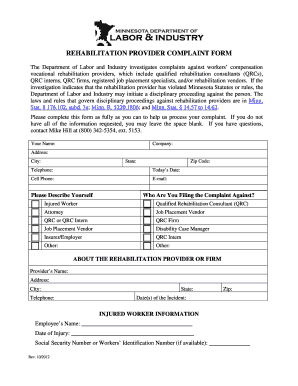
- Begin by providing your personal information, including your name, company, address, city, state, zip code, telephone number, cell phone, email address, and the date, to ensure the Department can contact you easily.
- Next, indicate your relationship to the case by selecting the appropriate option from the list provided, such as ‘injured worker’ or ‘qualified rehabilitation consultant’.
- Provide details about the rehabilitation provider or firm you are filing the complaint against by entering their name, address, city, telephone number, and relevant dates related to the incident.
- Fill in the injured worker's information, including their name, date of injury, and social security number or workers’ identification number, if available. This information will help specify the affected individual.
- In the following section, type or print a clear and concise description of your complaint. If needed, attach additional pages and any supporting documentation that reinforces your claims.
- Select all applicable nature of complaint checkboxes from the list provided. Ensure you select every issue that aligns with your experience to assist the investigation.
- Read the notice regarding privacy and information confidentiality. Then, check the appropriate box regarding the release of your information, ensuring you understand the implications.
- Finally, sign and date the form at the end. Ensure all pages are completed, accompanied by any supporting documentation.
- Once you have filled out the form, save your changes, then download, print, or share the form as necessary.
Complete your complaint today by following the steps outlined above.
Related links form
How to File a Complaint Contact a Regional Ombudsman for the county the person is in. Use the Regional Map or the Regional Ombudsman by County list. Call the OMHDD: 651-757-1800 or 1-800-657-3506. Email the OMHDD:ombudsman.mhdd@state.mn.us. Fax the OMHDD: 651-797-1950. Send us a letter by US postal mail: